
Widget types
A widget type is a kind of tile a user can add to a deck, next to Macro Deck’s six built-in ones.
Example
Section titled “Example”public sealed class GaugeIntegration : IPluginIntegration, IWidgetTypeProvider, IUiProvider{ private const string GaugeSchema = """ {"type":"object","properties":{"unit":{"type":"string"}},"required":["unit"]} """;
private string? _gaugeType;
public string ProviderName => "Gauges";
public async Task InitializeAsync(IWidgetTypeProviderContext context, CancellationToken cancellationToken = default) { var registration = await context.RegisterWidgetTypeAsync( new WidgetTypeDescriptor( "gauge", MyStrings.GaugeName(), MyStrings.GaugeDescription(), DefaultData: """{"unit":"km/h"}""", DataSchema: GaugeSchema, HasConfiguration: true), cancellationToken);
_gaugeType = registration.WidgetTypeId; // "com.example.gauges::gauge" }
public IReadOnlyList<UiSurfaceDeclaration> Surfaces { get; } = [ new UiSurfaceDeclaration { Kind = UiSurfaceKinds.Widget, SessionMode = UiSessionModes.Shared }, new UiSurfaceDeclaration { Kind = UiSurfaceKinds.Preview, SessionMode = UiSessionModes.Shared }, new UiSurfaceDeclaration { Kind = UiSurfaceKinds.Config, SessionMode = UiSessionModes.Exclusive }, ];
public Task<IUiSession?> CreateSessionAsync(UiSessionRequest request, CancellationToken cancellationToken) { var surface = request.Surface; var attributes = surface.Attributes;
UiElement? root = surface.Kind switch { UiSurfaceKinds.Widget or UiSurfaceKinds.Preview when attributes[UiWidgetSurfaceAttributes.WidgetType].GetString() == _gaugeType => GaugeView(70, attributes[UiWidgetSurfaceAttributes.Data].GetProperty("unit").GetString()!), UiSurfaceKinds.Config when attributes[UiConfigSurfaceAttributes.EntryPoint].GetString() == UiConfigEntryPoints.WidgetConfig && attributes[UiConfigSurfaceAttributes.WidgetType].GetString() == _gaugeType => GaugeConfig(attributes[UiConfigSurfaceAttributes.WidgetData]), _ => null, };
return Task.FromResult<IUiSession?>(root is null ? null : new ViewSession(new UiView(surface, root))); }
// IPluginIntegration members, GaugeView and GaugeConfig omitted.}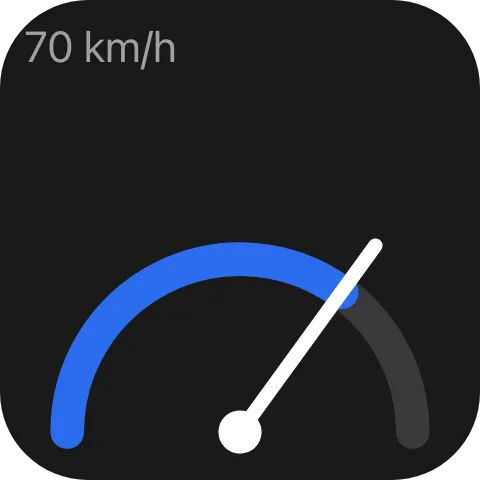
GaugeView builds the dial from a transform; ViewSession is the
adapter from Serving a view. Decline a type you do not serve rather than
guessing from the data’s shape. A widget of your type is placed, moved, resized, exported and imported
like a built-in one, and drawn by the same UI runtime.
Registering the type
Section titled “Registering the type”var registration = await context.RegisterWidgetTypeAsync(descriptor, cancellationToken);// registration.WidgetTypeId == "com.example.gauges::gauge"The qualified id is what every widget stores as its type. Keep it stable across releases - renaming it strands every widget already on a deck - and never reuse it for a different widget.
Registration is a push: register when you are ready, and register again under the same local id to change
the name, default data, schema or configuration flag; placed widgets pick the new descriptor up untouched.
GetWidgetTypes() only lets Macro Deck recover its catalog after a reconnect, and is optional. There is no
ShutdownAsync here: release what InitializeAsync acquired in your integration’s own ShutdownAsync,
and Macro Deck withdraws your types itself.
Default data and schema
Section titled “Default data and schema”DefaultData: """{"unit":"km/h"}""",DataSchema: GaugeSchema,DefaultData is the stored configuration a new widget starts with, as a JSON object; absent reads as
{}. DataSchema is a JSON Schema Macro Deck validates every save against, so configuration cannot write
a shape you cannot read back. It is optional for fixed data and required when HasConfiguration is
true. There is no icon: the picker draws a live sample instead.
Drawing each tile
Section titled “Drawing each tile”One session is opened per widget per viewer, so each tile sees only its own data. Push patches on the
session to update it; events its tree declares come back to that same session. Saved and draft data
arrive the same way, so a provider never has to look a widget up to draw it. By default a press runs nothing on
the host - a tile whose tree declares no events does nothing when pressed - unless the type
runs the user’s actions or has a
default Short Press action.
The picker card
Section titled “The picker card”UiSurfaceKinds.Preview // with attributes["sample"] == trueA picker card is a live preview surface with sample: true: draw a representative sample without
reading anything live. Serving it is optional - declining gets a card naming the type, and the type stays
pickable either way. Write the sample’s own words in the language UiWidgetSurface.Culture(surface) names,
see Deck widget views.
Reading a stored widget
Section titled “Reading a stored widget”var widget = await context.Widgets.GetWidgetDataAsync(widgetId, cancellationToken);var allowed = widget?.Data.TryGetProperty("allowModeration", out var value) == true && value.GetBoolean();A dialog or an action outlives the press that started it, and the user may change the widget meanwhile.
GetWidgetDataAsync reads the widget’s stored data at that moment, for a widget of one of your own types.
It answers null for a widget that does not exist, for another provider’s or a built-in widget, and on a
Macro Deck that predates it, so treat null as “not known” and do the safe thing. The data is the saved
configuration as stored, never a draft and without resolved colour references.
Configuration
Section titled “Configuration”UiSurfaceKinds.Config when attributes[UiConfigSurfaceAttributes.EntryPoint].GetString() == UiConfigEntryPoints.WidgetConfigWith HasConfiguration, editing a widget opens a config surface with the widget-config entry point.
Build it with the widget configuration view, whose two regions Macro
Deck lays out around your tree. What the user enters is stored with the widget and handed back on every
later widget surface. No second contract is needed - one more surface on the same IUiProvider.
Without HasConfiguration, no config surface is ever opened for your type: editing one of its widgets
shows the preview and the JSON view, and nothing else.
Running the user’s actions
Section titled “Running the user’s actions”new WidgetTypeDescriptor("battery", MyStrings.BatteryName(), DataSchema: BatterySchema, HasConfiguration: true){ SupportsFlows = true,}A widget that only shows information can still work like a button. With SupportsFlows, Macro Deck runs the
widget’s own action flows when its tile is pressed, the way it does for its built-in widgets: Short Press,
Long Press, Double Tap, Touch Start and Touch End each run the flow bound to that trigger. The flows come
from the top-level flows key of the widget’s stored data, so give the user the actions editor bound
there in your configuration tree, and let your DataSchema allow the key:
new UiActionsListEditor { Key = "flows", Binding = Bind.To(flows), CanRun = true }{"type":"object","properties":{"flows":{"type":"array"}}}The widget configuration view covers the editor. Your tree keeps priority: a press that one of its controls declares is sent to that control, as without the flag, and runs no flow.
- Hardware decks never produce a Double Tap for a widget of your type, only for built-in ones: a
Double Tap flow runs from the desktop app and the web client. Set
UiActionsListEditor.Triggersto the press tabs you want if that would confuse your users. - An older Macro Deck ignores the flag, and presses of your widget run nothing there, as before.
- While your type is not registered - your plugin stopped or not installed - Macro Deck cannot tell that the type opted in, and a press of its widget is refused as it is for any unknown type.
The default is false, and a type that leaves it unset behaves exactly as described above.
A default Short Press action
Section titled “A default Short Press action”new WidgetTypeDescriptor("lamp", MyStrings.LampName()){ DefaultShortPressAction = new WidgetDefaultAction("toggle", new Dictionary<string, string> { ["room"] = "kitchen" }),}A widget can come with a useful primary interaction before the user configures anything. With
DefaultShortPressAction, Macro Deck runs one of your own actions when the widget is short-pressed and the
user has not given it a Short Press action of their own. The built-in Weather widget works this way: a short
press opens its details.
- The user’s action wins. The default runs only while the widget’s Short Press flow is missing, empty
or has every action disabled. A type without
SupportsFlowshas no such flow, so its default always runs. A press that your tree claims goes to the tree and never runs the default. - Only your own action.
ActionIdnames an action your plugin declares; another integration’s action cannot be named, because a default runs without the user choosing it. A blankActionIdgets the type rejected at registration. - Parameters are text, typed from the action’s declared parameters and rendered like a value the user stored, so a template in one is resolved. A parameter you leave out gets its declared default.
- The action runs like one from the widget’s own flow:
ActionExecutionContext.OwnerWidgetIdnames the pressed widget andOriginClientIdthe client that pressed it, so the default can open a modal on that screen. - Every client runs it: the desktop app, the web client, the Companion app and hardware decks. A hardware deck is offered a press for a tile of your type even when the widget has no flow. It has no screen for a modal, so keep a default that opens one for widgets meant for a screen: the built-in Weather default is the one exception Macro Deck makes itself, and it does not run from a hardware deck.
- Nothing runs while your plugin is disabled or does not declare the action.
- An older Macro Deck ignores the property, and short presses of your widget run nothing there, as before.
Standard appearance
Section titled “Standard appearance”new WidgetTypeDescriptor("frame", MyStrings.FrameName(), DataSchema: FrameSchema, HasConfiguration: true){ AppearanceProperties = [ WidgetAppearanceProperty.BackgroundColor, WidgetAppearanceProperty.Label, WidgetAppearanceProperty.LabelColor, WidgetAppearanceProperty.Font, ],}A widget of your type can share the appearance settings of Macro Deck’s own widgets. Every type gets a
border: Macro Deck draws the ring around the tile from the border key of the widget’s stored data, and
the Set Border action writes it, with or without a declaration. AppearanceProperties adds any of
BackgroundColor, Label, LabelColor, Font and AccentColor. For each one you list, the widget appearance
actions (Set Background Color, Set Label, Set Label Color, Set Label Font, Set Accent Color) accept a widget of your
type and write the value to the stored data, under these keys:
| Key | Property | Value |
|---|---|---|
border |
Border, BorderColor |
{ "style": "...", "color": "#rrggbb" }. style is off, static, heartbeat, breathing, blink, comet, ants, hue-shift or rgb; without color the ring uses its default colour |
backgroundColor |
BackgroundColor |
#rrggbb or #rrggbbaa, or transparent |
label |
Label |
The text as entered |
labelColor |
LabelColor |
#rrggbb or #rrggbbaa |
fontFaceId |
Font |
A face id from the host’s font catalogue (the macrodeck.fonts option source) |
fontSize |
Font |
Size as a whole-number percentage |
textAlign |
Font |
left, center or right |
labelPosition |
Font |
top, center or bottom |
accentColor |
AccentColor |
#rrggbb or #rrggbbaa |
UiWidgetAppearanceKeys holds the names. Clearing a setting removes its key. Other values of
WidgetAppearanceProperty, such as Icon, are ignored for a provider’s type.
Macro Deck draws only the border. Draw the rest yourself: the change reopens your widget’s session with the
new data, and UiWidgetAppearance.Read gives you the values:
attributes.TryGetValue(UiWidgetSurfaceAttributes.Data, out var data);var appearance = UiWidgetAppearance.Read(data);
var root = new UiButton{    Key = "frame",    Background = appearance.BackgroundColor ?? "#1f2937",    Children = [new UiTextRun { Key = "caption", Text = appearance.Label ?? string.Empty, Color = appearance.LabelColor ?? "#ffffff" }],};
Your DataSchema has to allow the keys you declare. A property is offered for a widget only if the schema
accepts a plain sample value under its keys (#000000, Label, a font id with size 12, center), so keep
patterns, enums and ranges on these keys permissive, and a value your schema rejects, such as a label that fails a pattern, makes the action fail
instead of storing data your configuration could no longer save:
{ "type": "object", "properties": { "border": { "type": "object" }, "backgroundColor": { "type": "string" }, "label": { "type": "string" }, "labelColor": { "type": "string" }, "fontFaceId": { "type": "string" }, "fontSize": { "type": "number" }, "textAlign": { "type": "string" }, "labelPosition": { "type": "string" }, "accentColor": { "type": "string" } }}The widget configuration view has ready-made fields for the same keys.
- A background can be
transparent. The Set Background Color action stores whatever value it is given, and the configuration field offers Transparent when you opt in withTransparentBackground. Pass the value to your rootui.stackorui.buttonbackgroundas it is: when the root node’s background istransparent, Macro Deck also leaves out the tile’s own face and shadow, so the folder background shows through. The border ring is still drawn. A background oftransparenton any node below the root, or a root that is not a stack or button, keeps the tile face. - A colour can carry alpha. The actions store
#rrggbbaafor a translucent colour, including one taken from a Color variable when the action ran. Pass it on as it is: a reader draws it translucent. - The label is stored as entered. It may contain a
{{ ... }}variable template, which Macro Deck renders only for its own Action Button. Show the text as it is, or render it yourself. - Hardware devices read these keys too. A device plugin receives
label,labelColor,backgroundColor,fontSize,textAlignandlabelPositionfor every widget, but not the font face. - Every change reopens your widget’s session with the new data, so a flow that changes an appearance setting every second rebuilds your tree every second.
- While your type is not registered - your plugin stopped, or still starting - its widgets offer the border only, and the other actions fail for them.
- An older Macro Deck ignores the declaration and offers the border only, as before.
When your integration is not running
Section titled “When your integration is not running”await context.UnregisterWidgetTypeAsync("gauge", cancellationToken);A widget keeps its type and data whether or not anything provides them - stored, exported and re-imported unchanged, including on a machine where your plugin is not installed yet. When the type comes back, every widget of it returns exactly as it was. Unregistering only stops the type being offered in the picker. Macro Deck keeps your catalog entry across a mere disconnect, so a restarting plugin does not leave its widgets nameless; the entry goes only when the integration is uninstalled or stopped.
Over the plugin protocol
Section titled “Over the plugin protocol”Registration is driven from the plugin side, so the host-to-provider direction of the
widget-type-provider capability only has to describe the provider and re-read its catalog after a
reconnect:
| Operation | Purpose |
|---|---|
describe |
The provider’s declared name and its current catalog. |
widget-types |
The provider’s current widget type catalog, re-read after a reconnect. |
Registering and withdrawing a type travels the other way as the widget-types host API:
| Operation | Purpose |
|---|---|
register |
Registers a widget type, or replaces one already registered under the same provider-local id. |
unregister |
Withdraws a widget type. Widgets already using it keep their stored type and data and wait for it to return. |
The widgets themselves are drawn, previewed and configured over the ui capability, like every other
Macro Deck UI surface. GetWidgetDataAsync crosses as the widgets host API’s get-data operation; the host
takes the owner from the connection, never from the request.
See also
Section titled “See also”- Deck widget views - the attribute keys in full.
- Configuring a widget - the two-region configuration tree.
- Folder views - the same registration shape, one level up.
- Serving a view