
Macro Deck UI
Macro Deck UI lets a plugin describe what a person sees and can act on - once, as a tree of keyed elements - and Macro Deck renders that tree wherever it is needed: a config flow, an action’s configuration, a deck widget, a folder view or a modal dialog. The vocabulary is the same on every surface; only the box it is drawn in changes.
Install
Section titled “Install”<!-- Plugin project --><PackageReference Include="MacroDeck.Ui" Version="3.0.0" />
<!-- Test project --><PackageReference Include="MacroDeck.Ui.Testing" Version="3.0.0" />| Package | What it is |
|---|---|
MacroDeck.Ui |
The declarative C# DSL and the reactive runtime. Use it to author a view. |
MacroDeck.Ui.Model |
The transport-neutral tree, event and patch contract. Use it directly only when you need the low-level contracts. |
MacroDeck.Ui.Testing |
Renders and asserts against a view headlessly. |
A small view, end to end
Section titled “A small view, end to end”var muted = new UiState<bool>(false);
var tile = new UiButton{ Key = "mute", Justify = UiComponentJustify.Center, Background = UiValue.From(() => muted.Value ? "#ff3b30" : "#2c2c2e"), Events = [UiEventHandler.On(UiComponentEvents.Press, () => muted.Value = !muted.Value)], Children = [new UiTextRun { Key = "label", Text = UiText.From(() => muted.Value ? "Muted" : "Mute"), Size = 0.14 }],};
var view = new UiView(request.Surface, tile);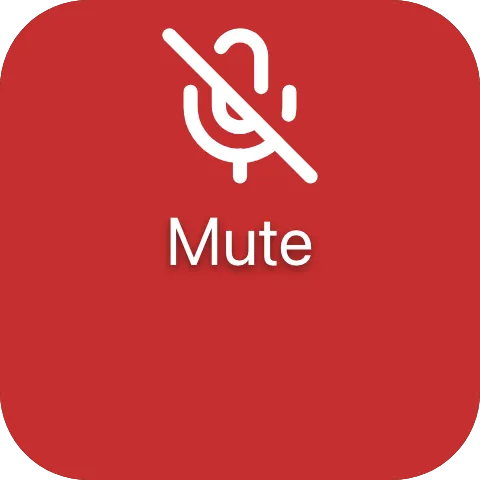
A press flips muted; the button’s face and label read it, so the view emits a patch for just those two
properties. UiView keeps the tree reactive; UiViewBuilder.Build(surface, root) makes a one-time tree
instead. Handing the view to Macro Deck is a separate step - see Serving a view. The
picture adds artwork to the same button - see Button.
One vocabulary, two namespaces
Section titled “One vocabulary, two namespaces”Every node type is ui.* or macrodeck.*. A component is macrodeck.* when a reader cannot draw it from
the tree alone, because it must resolve a Macro Deck-defined reference - a time or a media position -
against its own clock. Everything else is ui.*, however Macro Deck-flavoured its styling. See
ADR 0064.
Where to go next
Section titled “Where to go next”
- Components - the full
ui.*/macrodeck.*catalog, one page per family. - Views - the surfaces a tree renders on: sessions, configuration, deck widgets, folder views, modals and the developer preview.
- Concepts - the tree/patch model, state and bindings, events, reactive updates, sizing and theming.
- Reference - patch operations, resource handles and the compatibility contract across the three packages.