
Text
A single run of text, laid out with a line height of exactly one, so its box is exactly its font size.
ui.text
Example
Section titled “Example”new UiStack{ Key = "reading", Direction = UiComponentDirections.Horizontal, Align = UiComponentAlignments.Baseline, Gap = 0.02, Children = [ new UiTextRun { Key = "value", Text = UiText.From(() => state.Value.Value), Size = 0.24, Weight = UiComponentTextWeights.Bold, Digits = 3, }, new UiTextRun { Key = "unit", Text = "°C", Size = 0.1, Weight = UiComponentTextWeights.SemiBold, Role = UiComponentTextRoles.Secondary, }, ],}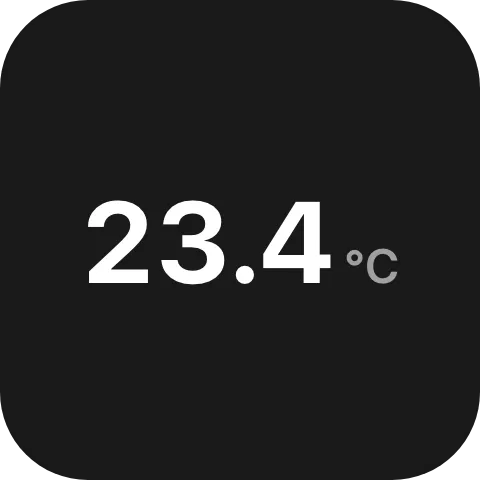
A large live reading with its unit beside it, adapted from the built-in History graph widget.
Live numeric readouts
Section titled “Live numeric readouts”Text = UiText.From(() => state.Value.Value),Digits = 2.5,Digits reserves room for that many digit widths, so a value that gains or loses a digit does not push
its neighbours sideways. It is a count, not a length, and may be fractional: a decimal separator is
narrower than a digit.
Shrinking to fit
Section titled “Shrinking to fit”new UiTextRun { Key = "providerName", Text = label, Size = 0.044, MinSize = 0.034 }The run shrinks from Size towards MinSize until it fits its box. Without MinSize it never shrinks
and ellipsizes instead.
Wrapping
Section titled “Wrapping”new UiTextRun { Key = "label", Text = label, Wrap = UiValue.Of(true), MaxLines = 3 }A run stays on one line unless Wrap is true. MaxLines caps how many lines it may use before it
ellipsizes.
Mixing text and images
Section titled “Mixing text and images”new UiTextRun{ Key = "message", Text = "ada: hi Kappa", Size = 0.08, Wrap = UiValue.Of(true), MaxLines = 4, Spans = UiValue.Of<IReadOnlyList<UiTextSpan>>( [ UiTextSpan.FromText("ada", color: "#9146ff", weight: UiComponentTextWeights.Bold), UiTextSpan.FromText(": hi "), UiTextSpan.FromImage(emote, alt: "Kappa"), ]),}Spans draws styled text and inline images as one paragraph, in place of Text. A text span may set its
own #rrggbb or #rrggbbaa colour and weight; anything it leaves out comes from the run. An image span is
a square one line high, so the line height stays exactly one and the run is as tall as it is without
images. While an image cannot be shown, its alt text is drawn in its place; an image without alt is
decorative and draws nothing.
Keep Text the plain equivalent of the spans - the same words, with each image as the text it stands for.
A reader that does not know spans draws Text instead. A span’s text is drawn exactly as given: it is
never resolved as a localization reference and never read as markup.
A text span can also be set in Italic, Underline or Strikethrough (the two lines combine), in a
Monospace face instead of the run’s own, and over a Background colour spelled like Color:
UiTextSpan.FromText("npm ci") with { Monospace = true, Background = "#1e1f22" }A reader that does not know one of these keys draws the span without it, so the words stay the same and only the styling is lost.
Colour
Section titled “Colour”Role = UiComponentTextRoles.Muted, // follows the reader's themeColor = "#ff8800", // a colour the user chose; wins over RoleUse Role for theme colours and Color only for a colour that is data. See
Colours and text.
To show the user’s colour at a lower emphasis, add alpha as a last pair of hex digits instead of mixing the colour with a background you cannot see:
Color = "#ffffffcc", // the user's white at 80 % opacity, over any backdropA reader from before eight-digit colours draws the Role colour instead. See
Compatibility.
Localized text
Section titled “Localized text”Text = "Now playing", // literalText = Strings.NowPlaying(), // your plugin's generated catalogA localization reference resolves in each reader’s own active language.
Properties
Section titled “Properties”| Property | Values | Default | Meaning |
|---|---|---|---|
Text (text) |
UiText: literal, computed or localized |
Nothing is drawn | The content. |
Size (size) |
UiSize length |
Left to the reader | The font size, which is also the run’s line height. |
MinSize (minSize) |
UiSize length |
Never shrinks; ellipsizes | The floor Size may shrink to so the run fits. |
Weight (weight) |
UiComponentTextWeights: regular, medium, semibold, bold |
regular |
The font weight. |
Role (role) |
UiComponentTextRoles: primary, secondary, muted |
primary |
The semantic colour, ignored when Color is set. |
Color (color) |
#rrggbb or #rrggbbaa |
Role decides |
A literal colour that overrides Role. The alpha pair makes it translucent over whatever is behind the run. |
Align (align) |
UiComponentAlignments: start, center, end, stretch, baseline |
start |
Alignment within the run’s own box. |
MaxLines (maxLines) |
int |
One; no limit when Wrap is true |
How many lines the run may occupy before it ellipsizes. |
Wrap (wrap) |
bool |
One line, ellipsized | Whether the run may break across lines at all. |
FontFace (fontFace) |
Font catalogue identifier | The reader’s default face | The typeface, from Macro Deck’s font catalogue. |
Digits (digits) |
double, digit widths |
Exactly as wide as the content | How many digit widths the run reserves. |
Spans (spans) |
List of UiTextSpan: text with optional color, weight, italic, underline, strikethrough, monospace and background, or image (UiResource) with optional alt |
Draws Text |
Inline runs of styled text and images drawn in place of Text. |
Shadow (shadow) |
bool |
The reader decides | false turns off the legibility shadow a reader draws behind text, such as Macro Deck’s shadow behind text on a button. |
StrokeColor (strokeColor) |
#rrggbb |
No outline | The colour of an outline around the glyphs. |
StrokeWidth (strokeWidth) |
UiSize length |
No outline | How far the outline reaches outside each glyph. Drawn only with StrokeColor and a width above zero. |
MainSize (mainSize), Fill (fill) |
See Sizing | Sized by the reader | The run’s extent along the parent stack’s main axis. |
Size is the font, MainSize is the extent along the parent’s main axis; setting one does not imply the
other.
A label that sits on artwork can drop the shadow and carry an outline instead:
new UiTextRun{ Text = "Play", Shadow = false, StrokeColor = "#000000", StrokeWidth = UiSize.FromBasis(0.01),}Events
Section titled “Events”None. ui.text is never interactive: a value it shows is patched by its producer, never entered by the
reader.
Children
Section titled “Children”None. ui.text is a leaf.
Layout
Section titled “Layout”The cross-axis extent is always the line height - exactly the resolved size - whatever the parent
offers. Along the main axis a text takes mainSize or fill if declared, otherwise the reader’s own
measurement.
Measured without a font, a text with neither mainSize nor fill takes nothing along the main axis.
So when a sibling fills a row, give every text in that row its own mainSize, or the filling sibling
takes their width too and pushes them out of the box. See Sizing.
Reader behaviour
Section titled “Reader behaviour”- Lay the run out with a line height of one; stack gaps are the only vertical spacing.
- Absent
wrapmeans one line, ellipsized. A reader that does not know the key does the same, so the run stays inside its box. - Reject any
colorthat is not#rrggbbor#rrggbbaa, and anyroleoutside the listed values, rather than passing it through to the styling layer. fontFace: hold the run back until the face is usable, then reveal it - never draw a fallback face and swap. If the face never arrives, or the identifier cannot be resolved, reveal the run in the default face.digits: draw every digit on the same advance width, and centre the content in the reservation when it is narrower.spans: draw the spans in one inline flow instead oftext, bounded bywrapandmaxLinesliketext. Draw each image square and one line high, aligned to the top of its line, so the line height stays one; draw itsalttext while the image is unavailable, or nothing whenaltis absent. Ignore a spancolorthat is not#rrggbbor#rrggbbaaand a span that carries neithertextnorimage. A reader that does not implementspansdrawstext.- Span styling: draw a text span in italics when
italicistrue, underlined and struck through whenunderlineandstrikethroughare (both together when both are), in a monospaced face whenmonospaceis, and overbackgroundwith a little padding when it is#rrggbbor#rrggbbaa. Ignore a value of any other type or spelling, and draw a span whose styling keys you do not implement as a plain span. shadow: whenfalse, draw no legibility shadow behind the run. Absent ortruekeeps the reader’s default. A reader that does not know the key keeps its default.strokeColorandstrokeWidth: draw an outline of that colour around every glyph, reachingstrokeWidthoutside the glyph edge and never eating into the glyph. The outline does not change the run’s box or its fit; give it room to paint instead of clipping it. Draw nothing when either key is missing or invalid, or the width is zero. A reader that does not know the keys draws no outline. Macro Deck’s renderer draws at most a tenth of the cell basis, keeps the legibility shadow of a run on a button around its outline unlessshadowisfalse, and shows an outlined run without outline or shadow where the browser cannot apply SVG filters to HTML.
See also
Section titled “See also”- Colours and text
- Sizing
- Time for clocks and timers that tick on the reader
- Text field for text the user types