
Progress
A playback timeline and its elapsed, remaining or total time. Both carry a progress reference - where the medium was at one instant and how fast it is moving - so a playing track needs no patch until it changes.
macrodeck.progress-bar, macrodeck.progress-text
Example
Section titled “Example”var position = UiValue.Of(UiProgressReference.Advancing(42_000, DateTimeOffset.UtcNow, durationMs: 215_000));
new UiStack{ Key = "timeline", Children = [ new UiProgressBar { Key = "progress", Value = position, Thickness = 0.02, MainSize = 0.02 }, new UiStack { Key = "times", Direction = UiComponentDirections.Horizontal, Justify = UiComponentJustify.SpaceBetween, Children = [ new UiProgressText { Key = "elapsed", Value = position, Format = UiProgressFormats.Elapsed, Role = UiComponentTextRoles.Muted }, new UiProgressText { Key = "duration", Value = position, Format = UiProgressFormats.Duration, Role = UiComponentTextRoles.Muted, Align = UiComponentAlignments.End }, ], }, ],}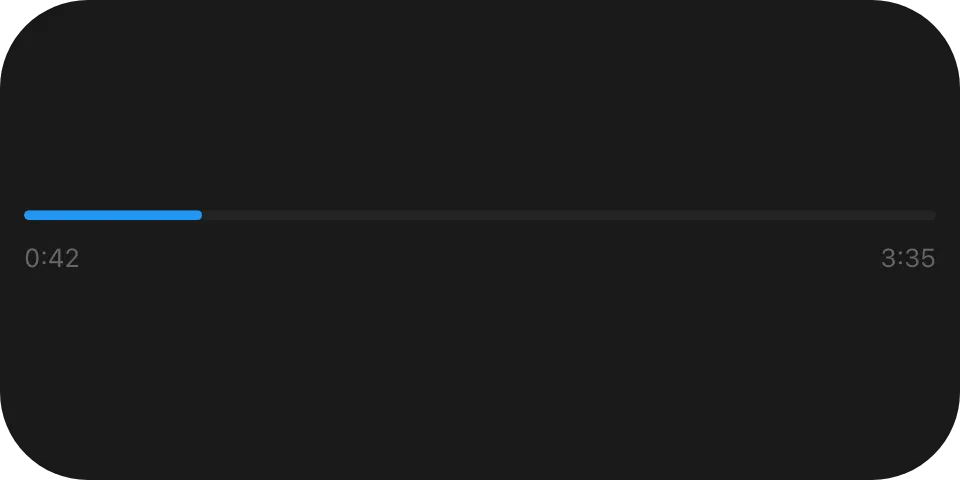
A track 42 seconds into 3:35, with 0:42 and 3:35 beneath it, both advancing on the reader’s clock -
the built-in Music Player widget’s timeline.
Paused vs playing
Section titled “Paused vs playing”UiProgressReference.Advancing(positionMs, now, durationMs) // rate absent - normal speedUiProgressReference.Halted(positionMs, now, durationMs) // "rate": 0Paused is a value, not something a reader infers. Send a new reference when playback starts, stops, seeks or changes track; while it plays on schedule, keep the previous one - the built-in player re-anchors only when the reported position drifts from the predicted one.
Elapsed and remaining
Section titled “Elapsed and remaining”Format (UiProgressFormats) |
42 s of 215 s | 3,725 s of 7,200 s | No duration |
|---|---|---|---|
elapsed (Elapsed) |
0:42 |
1:02:05 |
The position |
remaining (Remaining) |
2:53 |
57:55 |
Empty |
duration (Duration) |
3:35 |
2:00:00 |
Empty |
Hours appear only when the value shown reaches one, and every segment below the leading one is padded to
two digits. A caption bound to remaining or duration disappears for a live stream rather than counting
down from nothing.
A live stream
Section titled “A live stream”UiProgressReference.Advancing(positionMs, now) // no durationMsWith no duration the bar draws an empty track and only elapsed has anything to show.
Fallbacks
Section titled “Fallbacks”Fallback = new UiRangeBar { Key = "progressFallback", Start = 0, End = 42_000d / 215_000 },Give both a fallback holding the value at the anchor - a UiRangeBar for the bar, a UiTextRun for the
text - so an older reader shows the right picture at the wrong second rather than nothing.
Properties
Section titled “Properties”macrodeck.progress-bar
Section titled “macrodeck.progress-bar”| Property | Values | Default | Meaning |
|---|---|---|---|
Value (value) |
A progress reference | An empty track | The position to draw. |
StartColor (startColor) |
#rrggbb |
The reader’s accent colour | The colour at the start of the filled span. |
EndColor (endColor) |
#rrggbb |
The reader’s accent colour | The colour at the head of the filled span. |
Thickness (thickness) |
A length | Left to the reader | The track’s cross-axis thickness. |
macrodeck.progress-text
Section titled “macrodeck.progress-text”| Property | Values | Default | Meaning |
|---|---|---|---|
Value (value) |
A progress reference | Nothing is drawn | The position to draw. |
Format (format) |
elapsed, remaining, duration |
- | Which derivation to draw; an unknown value draws nothing. |
Size (size) |
A length | Left to the reader | The font size. |
MinSize (minSize) |
A length | Never shrinks; ellipsizes instead | The floor size may shrink to so the run fits. |
Weight (weight) |
A font weight | regular |
The font weight. |
Role (role) |
A text role | primary |
The semantic colour. |
Align (align) |
A UiComponentAlignments value |
start |
Alignment within the run’s own box. |
Events
Section titled “Events”None. Both are read-only - to let the user drag the position, use a Slider.
Children
Section titled “Children”None - both are leaves.
Layout
Section titled “Layout”macrodeck.progress-bar lays out like ui.range-bar: the track spans the element’s full main-axis
extent and is thickness tall on the cross axis. macrodeck.progress-text sizes like ui.text: its box
is its font size, with a line height of one. Both follow the ordinary leaf rule on their parent stack’s
main axis - mainSize or fill if declared, otherwise content extent. Full model:
Sizing.
Reader behaviour
Section titled “Reader behaviour”These are macrodeck.* types because a reader cannot draw them from the tree alone - it must resolve
$progress against its own clock. The governing contract is
ADR 0065.
{"$progress":{"positionMs":42000,"durationMs":215000,"anchor":"2026-08-25T12:00:00.000Z"}}resolves toclamp(positionMs + (t - anchor) * rate, 0, durationMs), wheretis now on the reader’s host-synchronised clock. With nodurationMsthe upper clamp is dropped.rateabsent means1;0means halted.- A negative
positionMsis clamped to zero, not rejected. positionMs,durationMsandratemust be numbers andanchoran ISO-8601 instant; a$progressmember with any other member, or a missingpositionMsoranchor, is rejected.- A reader re-evaluates at least once a second. Sub-second interpolation is allowed but not required.
- The bar’s geometry is
ui.range-bar’s exactly, with the span starting at the track’s start and no marker. Its end isposition(t) / durationMsclamped to0..1, and0with nodurationMs. - Every format is a duration, not a clock time: no zone, no day period, no hour cycle.
remaininganddurationare empty with nodurationMs.- Digits are drawn with equal advance width, so the run does not shift as it counts.
- A reader draws nothing for a
formatit does not know.
See also
Section titled “See also”- Range bar - the shared bar geometry
- Time and clock - the same idea for the current time
- Slider
- Sizing