
Modal views
An action can put a dialog on the client that ran it and, when it needs one, wait for the answer. A widget or another view can do the same on the client that pressed it, through the event’s origin.
Example
Section titled “Example”public async Task<ActionResult> ExecuteAsync(ActionExecutionContext context){ if (context.Ui is null) { return ActionResult.Success(); }
var result = await context.Ui.ShowModalAsync<string>( context.OriginClientId, new ModalDefinition { ViewId = "device-picker", Title = MyStrings.SelectDevice() }, context.CancellationToken);
if (result.Cancelled) { return ActionResult.Success(); }
await TransferAsync(result.Value!, context.CancellationToken); return ActionResult.Success();}The dialog itself comes from your IUiProvider:
public IReadOnlyList<UiSurfaceDeclaration> Surfaces { get; } =[    new UiSurfaceDeclaration { Kind = UiSurfaceKinds.Dialog, SessionMode = UiSessionModes.Exclusive },];
public Task<IUiSession?> CreateSessionAsync(UiSessionRequest request, CancellationToken cancellationToken){    var surface = request.Surface;    if (surface.Kind != UiSurfaceKinds.Dialog        || surface.Attributes[UiDialogSurfaceAttributes.ViewId].GetString() != "device-picker")    {        return Task.FromResult<IUiSession?>(null);    }
    var picker = new UiList    {        Key = "devices",        Gap = UiSize.FromBasis(0.015),        Children = [.. _devices.Select(device => new UiButton        {            Key = device.Id,            Answer = UiValue.Of(device.Id),            Events = [UiEventHandler.On(UiComponentEvents.Press, () => { })],            Children =            [                new UiTextRun { Key = "name", Text = device.Name, Size = UiSize.FromBasis(0.038) },                new UiTextRun { Key = "detail", Text = device.Detail, Size = UiSize.FromBasis(0.03), Role = UiComponentTextRoles.Secondary },            ],        })],    };
    return Task.FromResult<IUiSession?>(new ViewSession(new UiView(surface, picker)));}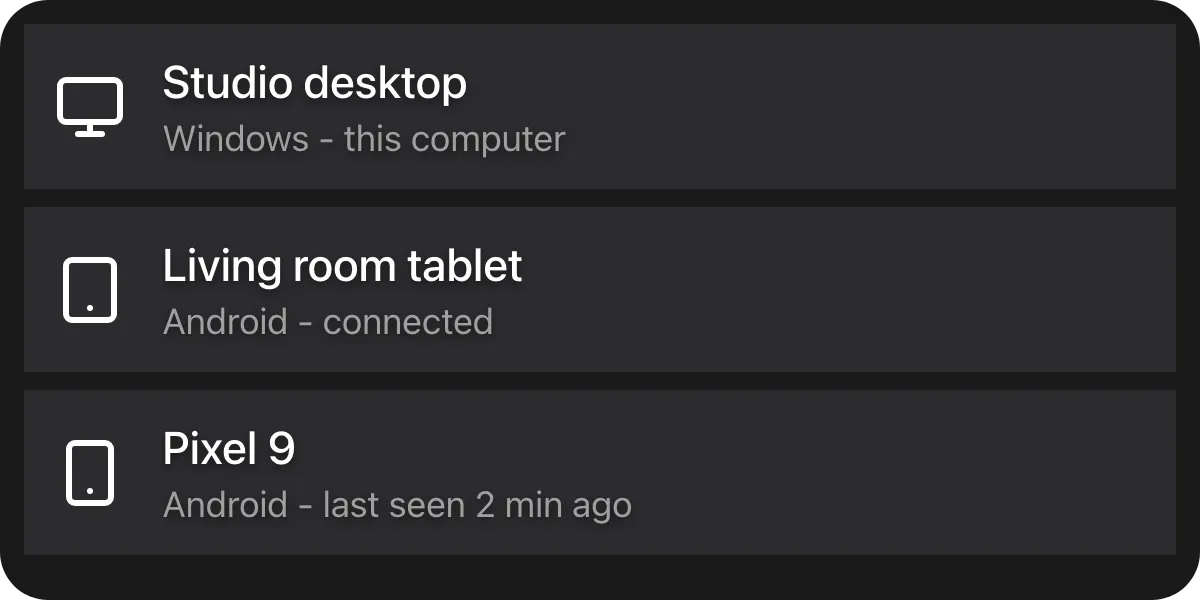
ViewId names one of your dialogs; Macro Deck opens a dialog surface for it against your provider.
ViewSession is the adapter from Serving a view. A null context.Ui means
the run was started by the backend - there is nobody to ask, which is not a failure.
The dialog surface
Section titled “The dialog surface”A dialog surface carries modalId, viewId and whatever Data the action passed
(UiDialogSurfaceAttributes). Decline a viewId you do not serve rather than guessing. A dialog is
exclusive: it belongs to one client, so unlike a deck widget its tree may carry entered values.
It also carries culture (the language the person reads Macro Deck in, for example de) and hourCycle
(h12 or h23, already following the person’s time format setting). Use them when you write a time of
day or other formatted value as text. An older host sends neither, so fall back to your own default.
Completing a modal
Section titled “Completing a modal”Answer = UiValue.Of(device.Id),Events = [UiEventHandler.On(UiComponentEvents.Press, () => { })],A pressed container that carries an Answer settles the dialog with that string. The client settles it
directly, so your session never sees that press. Answer works on any container that declares press;
it is an identifier, not a payload, so look anything else up on your side by it. At the protocol level,
a tree event named modal.complete also settles the dialog, with its payload as the value. Every other
event is routed to your session as usual.
ShowModalAsync<T> deserializes the value into T; a value that does not fit T is logged and reads as
a cancellation.
Showing without waiting
Section titled “Showing without waiting”var opened = await context.Ui.ShowModalAsync( context.OriginClientId, new ModalDefinition { ViewId = "now-playing", Data = new Dictionary<string, JsonElement> { ["track"] = JsonSerializer.SerializeToElement("Nightcall") }, }, context.CancellationToken);The non-generic overload is for a modal that shows something rather than asks something. It returns as
soon as the modal is open, with true if it opened.
Opening a dialog from a widget
Section titled “Opening a dialog from a widget”A press on your widget hands the session an IUiEventOrigin (see
Answering the client that acted). It opens your
dialog on the client that pressed, with the same ModalDefinition and the same answer rules:
var answer = await origin.ShowModalAsync<string>( new ModalDefinition { ViewId = "device-picker", Title = MyStrings.SelectDevice() }, cancellationToken);Unlike an action’s modal, nothing bounds the wait but your cancellationToken, the user and the client
staying attached: a client that leaves the view or disconnects ends it as a cancellation. Pass a token that
ends with the work the dialog belongs to.
A dialog is also the fallback for a link. origin.OpenUrlAsync(url) opens a web page in the browser of the
device that pressed, but answers false on a client that cannot open links, such as a hardware deck or an
older client, on a Macro Deck that predates it, and once the press is more than a few seconds old. Show the
address in a dialog then, as selectable text, so the user can still reach it; see
Opening a link on the client that pressed.
How a dialog is sized
Section titled “How a dialog is sized”Lengths are fractions of the box Macro Deck hands the dialog - see Sizing. The box is a fixed size and does not grow to your tree, because a box that grew would feed the content’s height back into the basis it is measured against. A tree taller than its box scrolls vertically. It never scrolls sideways: a tree wider than its box is an authoring mistake, and Macro Deck clips it.
The box differs between a desktop window and a phone. UiResponsive lets a
dialog lay itself out differently in a narrow box.
What bounds the wait
Section titled “What bounds the wait”Check Cancelled before touching Value. Everything that is not an explicit completion is a
cancellation - the user dismissing it, the client disconnecting, the flow being cancelled, the session
faulting, the run reaching Macro Deck’s maximum flow duration. So awaiting a modal cannot hang, and you
never have to tell “cancelled” from “never answered”.
A flow that runs longer than a few seconds detaches and keeps running, which is what makes waiting on a person viable. It still occupies one of the host’s concurrent run slots while its modal is open, and a client can only show a few modals at once. Do not hold a modal open as a substitute for a deck widget.
See also
Section titled “See also”- Serving a view - including the
modal.resultprotocol operation. - List
- Button
- Events
To ask something of every client at once, or to show a message that is not tied to a running action, see Notifications.