
Folder views
A folder view replaces a folder’s widget grid with your own tree - a dashboard, a mixer, a monitoring panel.
Example
Section titled “Example”public sealed class MonitorIntegration : IPluginIntegration, IFolderViewProvider, IUiProvider{ private string? _dashboard;
public string ProviderName => "System monitor";
public async Task InitializeAsync(IFolderViewProviderContext context, CancellationToken cancellationToken = default) { var registration = await context.RegisterFolderViewAsync( new FolderViewDescriptor( "dashboard", MyStrings.DashboardName(), MyStrings.DashboardDescription(), HasConfiguration: true), cancellationToken);
_dashboard = registration.FolderViewId; // "com.example.monitor::dashboard" }
public IReadOnlyList<UiSurfaceDeclaration> Surfaces { get; } = [ new UiSurfaceDeclaration { Kind = UiSurfaceKinds.Folder, SessionMode = UiSessionModes.Shared }, new UiSurfaceDeclaration { Kind = UiSurfaceKinds.Config, SessionMode = UiSessionModes.Exclusive }, ];
public Task<IUiSession?> CreateSessionAsync(UiSessionRequest request, CancellationToken cancellationToken) { var surface = request.Surface; var attributes = surface.Attributes;
UiElement? root = surface.Kind switch { UiSurfaceKinds.Folder when attributes[UiFolderSurfaceAttributes.ViewId].GetString() == _dashboard => Dashboard(attributes[UiFolderSurfaceAttributes.Configuration]), UiSurfaceKinds.Config when attributes[UiConfigSurfaceAttributes.EntryPoint].GetString() == UiConfigEntryPoints.FolderViewConfig && attributes[UiConfigSurfaceAttributes.FolderViewId].GetString() == _dashboard => DashboardConfig(attributes[UiConfigSurfaceAttributes.FolderViewConfiguration]), _ => null, };
return Task.FromResult<IUiSession?>(root is null ? null : new ViewSession(new UiView(surface, root))); }
private static UiStack Dashboard(JsonElement configuration) => new() { Key = "dashboard", Direction = UiComponentDirections.Horizontal, Gap = 0.04, Padding = 0.04, Children = [ new UiClockDial { Key = "clock", Value = UiValue.Of(UiTimeReference.InZone("Europe/Berlin")), Fill = true }, Card("cpu", "CPU"), Card("gpu", "GPU"), ], };
// IPluginIntegration members, Card and DashboardConfig omitted.}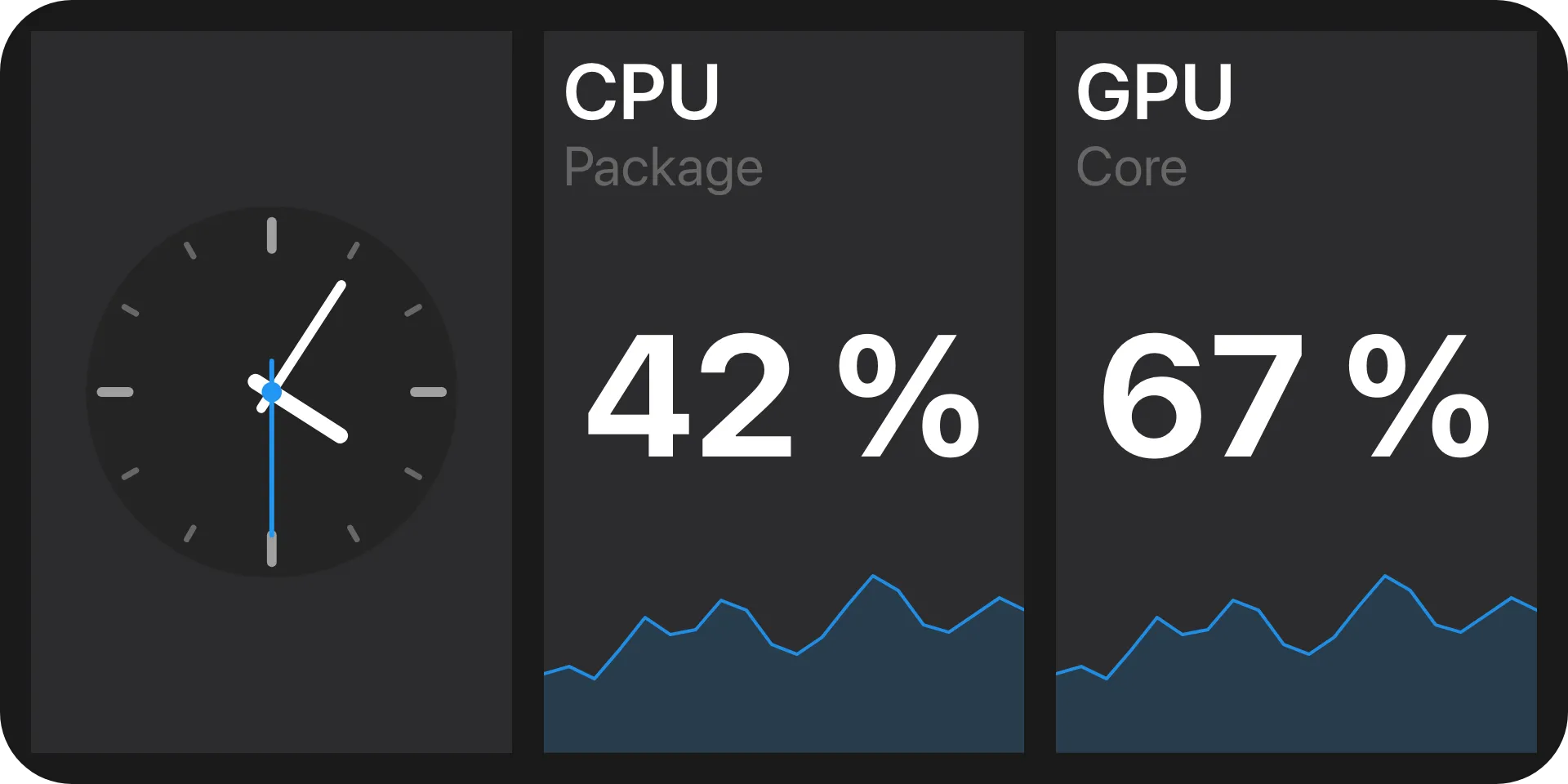
ViewSession is the adapter from Serving a view. A folder stays an ordinary
folder: its view is part of its configuration, picked like its name and changeable later without
touching anything else. Macro Deck’s built-in view is the widget grid.
Registering the view
Section titled “Registering the view”var registration = await context.RegisterFolderViewAsync(descriptor, cancellationToken);// registration.FolderViewId == "com.example.monitor::dashboard"The qualified id is what a folder stores. Keep it stable across releases - renaming it strands every folder already using the view.
Registration is a push: register when you are ready, withdraw when you are not. GetFolderViews() only
lets Macro Deck recover its catalog after a reconnect, and is optional. There is no ShutdownAsync here:
release what InitializeAsync acquired in your integration’s own ShutdownAsync, and Macro Deck
withdraws your views itself.
Drawing the folder
Section titled “Drawing the folder”var viewId = attributes[UiFolderSurfaceAttributes.ViewId].GetString();var configuration = attributes[UiFolderSurfaceAttributes.Configuration];A folder surface carries folderId, folderName, viewId and configuration. The configuration
travels with the request because you cannot read Macro Deck’s stored folders. Decline a view you do not
serve rather than guessing from the configuration’s shape.
The tree is built from the same components as a deck widget, with two consequences:
- A folder view does not scroll. Everything has to fit the box you are given.
- Lengths are fractions of the box’s smaller side. A folder view is usually far wider than tall, so sizes track its height - see Sizing.
- A different layout per screen - a phone in portrait, a tablet in landscape - comes from
UiResponsive, which chooses by the folder view’s own box.
Configuration
Section titled “Configuration”UiSurfaceKinds.Config when attributes[UiConfigSurfaceAttributes.EntryPoint].GetString() == UiConfigEntryPoints.FolderViewConfigWith HasConfiguration, picking your view opens a config surface with the folder-view-config entry
point, inside the folder’s own dialog rather than as a flow of its own. Build it with the
configuration view. It carries folderId, folderViewId and
folderViewConfiguration; folderViewId is the view being configured, which is not always the one the
folder currently stores - the user is choosing. The values are stored with the folder and handed back on
every later folder surface.
To let the user choose a folder of files for the view, use a path input.
Navigation is Macro Deck’s
Section titled “Navigation is Macro Deck’s”new FolderViewDescriptor("mixer", "Mixer", Navigation: FolderViewNavigation.Hidden);Macro Deck draws the back button and it always drives Macro Deck’s own navigation stack - you cannot
redirect it and need not draw one. Hidden says your view has its own way out; it is a preference, not a
guarantee. Macro Deck still shows its button when the view is the only thing on screen and there is
somewhere to go back to, so a broken view can never trap anyone. At a root folder it draws no button,
whatever you asked for.
When your integration is not running
Section titled “When your integration is not running”await context.UnregisterFolderViewAsync("dashboard", cancellationToken);A folder keeps its view id and configuration whether or not anything provides them. Macro Deck renders a placeholder naming the missing view, with links to the integrations page and the folder’s settings. Nothing is cleared, so re-enabling your integration brings the folder back exactly as it was - including after an archive import on a machine without your plugin. Unregistering only stops the view being offered.
Where a folder view can be chosen
Section titled “Where a folder view can be chosen”The choice appears - in a folder’s context menu and when creating one - only when more than one view is on
offer and the device claiming the profile can render one (LayoutVisualCapabilities.CustomFolderViews, see
Layout providers). A profile no device claims keeps the choice. So a registered view
may not be an option on some profile; nothing selects it there, so nothing opens a session for it.
Over the plugin protocol
Section titled “Over the plugin protocol”Registration is driven from the plugin side, so the host-to-provider direction of the
folder-view-provider capability only has to describe the provider and re-read its catalog after a
reconnect:
| Operation | Purpose |
|---|---|
describe |
The provider’s declared name and its current catalog. |
folder-views |
The provider’s current folder view catalog, re-read after a reconnect. |
Registering and withdrawing a view travels the other way as the folder-views host API:
| Operation | Purpose |
|---|---|
register |
Registers a folder view, or replaces one already registered under the same provider-local id. |
unregister |
Withdraws a folder view. Folders still using it keep their stored id and configuration and show a placeholder until it returns. |
The views themselves are served over the ui capability, like every other Macro Deck UI surface.
See also
Section titled “See also”- Widget types - the same registration shape, one level down.
- Layout providers
- Serving a view
- Components