
Troubleshooting
Find your symptom below. If nothing here helps, ask on Discord or open an issue on GitHub and attach your logs. A problem with a plugin or icon pack from the Store belongs to its creator: use the links on the item’s Store page to open an issue in its repository or report it.
Where to find the logs
Section titled “Where to find the logs”Macro Deck writes its logs to the logs folder inside its data folder:
| System | Data folder |
|---|---|
| Windows | %APPDATA%\MacroDeck |
| macOS | ~/Library/Application Support/MacroDeck |
| Linux | ~/.local/share/MacroDeck, or $XDG_DATA_HOME/MacroDeck if that is set |
An exported profile, folder or button will not import
Section titled “An exported profile, folder or button will not import”An invalid JSON error identifies a location such as
content.json:$.widgets[0].width:2:24: the archive entry, the JSON path, then the line and byte position
(both start at one). The byte position may differ from a text editor’s character column when the line
contains non-ASCII text.
If you generated or edited the archive yourself, check that field’s type and the JSON syntax. For example,
grid dimensions require integer tokens such as 3, not 3.0. Re-exporting the item from Macro Deck is
another way to obtain the supported format. A valid JSON file can still contain an incompatible field type.
If the file came from someone else, share the error location with its creator. Do not post an entire archive publicly if it contains private commands, variables or secrets. Other archive failures can still show the general invalid-archive error; the JSON location is only available when parsing fails.
JSON rejections during profile, folder or button import, and invalid JSON found while inspecting a
manifest, also produce a warning in the existing host logs. Look for Rejected portable archive:
the entry records the operation, InvalidJson and the same JSON location shown in the dialog. The log
does not include the archive contents, password or local filename. The configured minimum log level
must allow warnings. JSON paths can include custom field names, so review an excerpt before sharing it.
A device cannot connect
Section titled “A device cannot connect”- Same network: your phone, tablet or browser must be on the same network as the computer running Macro Deck. A phone on mobile data cannot reach it.
- Client isolation: many routers can stop devices on the same Wi-Fi from reaching each other, often called AP isolation, client isolation or wireless isolation. Guest networks and public Wi-Fi almost always have it on. Connect both devices to the main network, or turn the setting off in your router.
- Different subnets: a mesh system, a second router or separate networks for 2.4 GHz and 5 GHz
can put the two devices in different subnets that do not route to each other. Compare the first
parts of both devices’ IP addresses, for example
192.168.1.xand192.168.0.x. - VPN: a VPN on either device can send local traffic through the tunnel instead of your network. Disconnect it, or allow local network access in the VPN app.
- Local network permission: on iPhone and iPad, apps and some browsers such as Chrome need the Local Network permission, under Settings > Privacy & Security > Local Network.
- Port: Macro Deck listens on port
8193by default, and on8194for HTTPS. You can see the port it is actually using in Settings > Network. - Firewall: allow Macro Deck, or the port above, through the firewall of the computer running it.
- Wi-Fi driver: see the connection drops after a few minutes.
- No Wi-Fi at all: a phone or tablet can connect over a USB cable instead, see Connect over USB.
The connection drops after a few minutes
Section titled “The connection drops after a few minutes”Devices connect at first, then disconnect or stop responding after a few minutes, often while the deck sits idle.
- Wi-Fi driver of the computer: some Wi-Fi adapter drivers, especially in laptops, drop clients that have been idle for a few minutes. Update the driver from the laptop or adapter manufacturer. Do not fall back to a much older driver instead: it can make the adapter unstable on newer hardware.
- Power saving: in Windows, open Device Manager, open the Wi-Fi adapter’s properties and turn off Allow the computer to turn off this device to save power on Power Management.
- Wired connection: connect the computer running Macro Deck to the router with a cable. A phone or tablet can also connect over USB.
Macro Deck is not listening on its port
Section titled “Macro Deck is not listening on its port”If another program already uses the port, Macro Deck starts without it and devices cannot connect. Settings > Network then says the port could not be used. Choose a different port there and restart Macro Deck.
A device says the deck needs an update
Section titled “A device says the deck needs an update”After Macro Deck is updated, connected devices load the new version of the deck by themselves. If a device keeps the old version, it shows This deck needs an update instead of the deck.
- Select Update now. The device drops the copy of the deck it kept and loads the current one.
- If the screen comes back, clear the website data for Macro Deck’s address in the browser settings. If you added the deck to your home screen, remove it and add it again.
The desktop app shows Macro Deck needs to refresh for the same situation. Select Refresh, or quit Macro Deck completely and open it again.
Macro Deck was not updated completely
Section titled “Macro Deck was not updated completely”Macro Deck shows Macro Deck was not updated completely when some of its files are missing or do not match the version that is installed. This happens when an update was interrupted, for example when antivirus software held back some of Macro Deck’s files while they were being installed. Devices and the desktop app show it when the files for the interface are affected, and the desktop app also shows it as a notification when Macro Deck checks its own files on startup. Clearing the browser cache does not help here.
- Download the latest version of Macro Deck and install it again over the existing installation. Your decks and settings stay in the data folder, which the installation does not replace.
- If your antivirus software reported a Macro Deck file during the update, allow that file, then repeat the installation.
- Select Retry on the device.
Both screens show the build of the interface and the build of Macro Deck on the computer. Include them when you ask for help.
If the notification appears in the desktop app, install Macro Deck again the same way: select Open download page in the notification, install the download over the existing installation, and start Macro Deck again. Open logs lists the files that were missing or did not match. If Macro Deck no longer starts at all, the Macro Deck stopped window says the same and links to the download page.
If you installed Macro Deck with a Linux package manager (APT, the DEB or RPM package, or the AUR), install
it again with that package manager instead, for example sudo apt install --reinstall macro-deck.
Buttons do nothing and devices show a lock screen
Section titled “Buttons do nothing and devices show a lock screen”On Windows and macOS, Macro Deck does not run actions while the computer it runs on is locked. Unlock the computer and try again. Linux works differently, see Buttons still work while a Linux computer is locked.
Connected devices show a lock screen for as long as the computer is locked. You can keep the deck visible instead by turning off Lock clients when this computer is locked in Settings > Security. Actions stay blocked either way, and so do widgets and dialogs that come from a plugin or an integration, such as the Twitch and YouTube chat: pressing one shows that the computer is locked, and the widget keeps showing its content.
Buttons still work while a Linux computer is locked
Section titled “Buttons still work while a Linux computer is locked”On Linux, Macro Deck cannot tell whether the computer is locked, so locking it changes nothing for Macro
Deck. Connected devices keep showing the deck, and anyone using one of them or a hardware deck can still press
buttons, run scripts and use widgets. Their actions run on the locked computer as if it were unlocked, for
example opening websites, starting programs or running commands. Lock clients when this computer is
locked in Settings > Security has no effect there, and the System integration’s Locked variable
(system_locked) has no value.
If nobody else should be able to use the computer through Macro Deck while you are away, quit Macro Deck before you leave it.
A dialog says it cannot be shown
Section titled “A dialog says it cannot be shown”Some buttons ask a question first, for example a countdown that asks for its duration. If that dialog could not be opened, or was closed before it showed anything, it says This dialog cannot be shown and an error code instead. Close it and press the button again; the action that asked is cancelled, not left waiting.
If it keeps happening, report it with the error code and your logs. The log records which dialog was refused and why.
The visual editor says a configuration is too large
Section titled “The visual editor says a configuration is too large”A widget’s editor shows its settings in Visual mode for as long as the configuration fits. A button with a very large number of actions across its triggers and events can outgrow it. The editor then says the configuration is too large instead of showing the settings, and Save stays off in Visual mode.
- If an edit you just made caused it, choose Restore last working version. The editor goes back to the last configuration it could show, and you can continue there.
- If the configuration was already that large when you opened it, switch to JSON mode and remove some actions or events.
To keep a button small, put a long list of actions into a script and run it from the button with Run Script.
The Companion app stays unlicensed after a purchase
Section titled “The Companion app stays unlicensed after a purchase”When a Companion app that was bought connects, Macro Deck exchanges the purchase for a license with the Macro Deck servers. Settings > Companion App shows the progress:
- Your purchase is being turned into a license: the computer running Macro Deck needs an internet connection. Macro Deck keeps trying on its own, first after a few seconds and then less often, at least every 30 minutes, also after a restart. The page shows when the next attempt runs. A purchase the store is still processing can take a while.
- Licensed: Macro Deck hands the license to every Companion app that connects to it.
- Licenses cannot be checked right now: Windows’ cryptography service is not available, so Macro Deck cannot check any license. It keeps the license it has and checks again on its own. Make sure the CNG Key Isolation service (KeyIso) is running in Services, or restart the computer.
- Not licensed, nothing pending: the store did not confirm the purchase, for example after a refund or for a test purchase. Macro Deck asks again at most once a day, and never again for a refunded, cancelled or revoked purchase. Check the purchase in the Google Play or App Store account the app was bought with, and ask on Discord if it looks right there.
If you bought the Macro Deck 2 app for iPhone or iPad, you do not need to buy the Companion app again. Open the Macro Deck 2 app on the same network, choose Transfer my purchase and confirm that the identity it shows matches Identity in Macro Deck’s connection panel. Macro Deck then turns the purchase into a license like any other, and the page above shows its progress. A download from the time the app was still free is not a purchase and cannot be transferred. If the app reports that the purchase could not be verified, the Macro Deck servers may not accept these purchases yet; try again a day later.
When you are signed in under Settings > Account, Macro Deck saves a license it got from a purchase to your Macro Deck account, and the page says so. Your other computers signed in to the same account that have no license yet receive it within about a minute, and hand it to their Companion apps. Macro Deck shows a notification whenever it receives a license from a device or downloads one from your account. A license a computer only received from someone else’s Companion app is not saved to your account; a license that was already on the computer before it could save licenses to accounts is treated like one from a purchase. If a computer already has a different working license, it keeps it; a revoked license is replaced by the working one.
For support, quote the License ID shown on that page. It is safe to share; the license itself is never shown.
Macro Deck does not open a second time
Section titled “Macro Deck does not open a second time”Only one Macro Deck can run on a computer at a time. If it is already running, starting it again does not open a second copy. Look for the running Macro Deck in the system tray or menu bar.
Macro Deck shows an older version after you started a new one
Section titled “Macro Deck shows an older version after you started a new one”About and the version at the bottom of the sidebar show the version that is actually running. If they show an older version than the one you just started, for example after downloading a new AppImage, the older Macro Deck was still running in the system tray, and plugins that need the newer version cannot be installed. Current versions close the running Macro Deck and start the new one when you start a different version. Older versions do not, so:
- Select Quit in the Macro Deck tray menu.
- Start the new version again.
If you start Macro Deck automatically when you sign in, it starts the new version from then on once the new version has run.
Macro Deck stopped
Section titled “Macro Deck stopped”Macro Deck runs its host, the part that talks to your devices and plugins, as a separate process. If the host stops unexpectedly, Macro Deck restarts it on its own: up to three times, waiting a few seconds longer before each attempt. Devices reconnect once the host is back, and the log records every attempt.
If the host does not come back, or does not start at all, Macro Deck shows a Macro Deck stopped window instead:
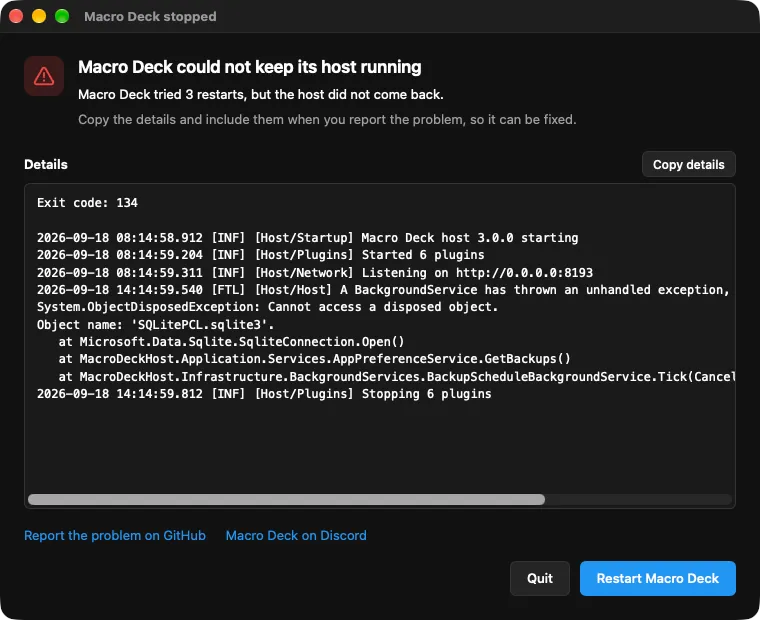
- Copy details copies the exit code and the last lines of the host output. Include them, along with your logs, when you report the problem.
- Restart Macro Deck starts Macro Deck again from scratch.
- Quit, or closing the window, quits Macro Deck.
If the window says a port is already in use, see Macro Deck is not listening on its port.
If the window says Macro Deck could not use the operating system’s cryptography service, Windows’ CNG Key Isolation service (KeyIso) is stopped or not reachable. Open Services, start CNG Key Isolation (and change its startup type if it was set to Disabled), or restart the computer. Then choose Restart Macro Deck. While that service is unavailable Macro Deck also cannot serve HTTPS and cannot check Companion licenses; both come back once the service runs again. A Companion app paired with this computer shows it as offline until then, without asking you to pair it again, and keeps its own license or trial.
If the window says this data folder was last used by a newer version of Macro Deck, you started an older version than the one that used it last, for example after switching back to an older release. Macro Deck stops before it changes anything, so your data is unchanged: install the newest Macro Deck you used with this data again.
If the host does not start although nothing seems to use the port, a host left over from an earlier Macro Deck may still be running and can no longer be taken over. End the Macro Deck Host process in Task Manager or Activity Monitor, then choose Restart Macro Deck.
Plugins show up as dotnet in Task Manager
Section titled “Plugins show up as dotnet in Task Manager”Most plugins run on the .NET runtime that comes with Macro Deck, so Task Manager and Activity Monitor
list them as dotnet or “.NET Host” rather than by the plugin’s name. This is expected; ending
Macro Deck ends them too.
A plugin in the Store shows Certificate revoked
Section titled “A plugin in the Store shows Certificate revoked”Macro Deck revoked the certificate that signed the installed version of this plugin, or the certificate that vouches for it. The installed version keeps working, but Macro Deck refuses to install or update anything signed with that certificate. Wait for an update signed with a new certificate, or uninstall the plugin if you no longer trust it. Installing or updating it from the Store fails with the message that Macro Deck could not verify who published the package.
A plugin update says it is signed by a different publisher
Section titled “A plugin update says it is signed by a different publisher”The package or Store update was signed by someone other than the publisher of the version you already have, so Macro Deck kept your installed version. A package that claims to be an update of a plugin but comes from another publisher could take over everything that plugin stores, such as its accounts and settings. Get updates from the plugin’s own publisher. If the plugin really changed hands, or you want to switch to the other publisher’s package, uninstall the plugin first and tick Also delete the plugin’s stored data, then install it again.
A reverse proxy or firewall blocks a connection to a service
Section titled “A reverse proxy or firewall blocks a connection to a service”Some reverse proxies and anti-bot protections reject requests they take for automated traffic, so an
integration such as Home Assistant behind a proxy cannot connect. Macro Deck identifies itself to the
services its built-in integrations talk to with a User-Agent of MacroDeck/ followed by the running
version. If your proxy blocks it, open Settings > Advanced > HTTP and enter a value the proxy accepts
under HTTP User-Agent. Restore default puts the standard value back.
- A change applies to new requests and new connections. A connection that is already open, such as a Home Assistant WebSocket, keeps the old value until it reconnects.
- The setting covers the built-in integrations only. Plugins from the Store set their own
User-Agent. - The integrations for OBS Studio and the Twitch API do not send this header, so the setting has no effect on them.
Discord cannot be connected
Section titled “Discord cannot be connected”If the Discord setup says that only a Discord Rich Presence service was found, or Discord stays disconnected, Macro Deck cannot find the official Discord desktop app. Third-party clients such as Vesktop, Equibop, Legcord or Dorion can share game activity, but Macro Deck cannot control them. Start the official Discord desktop app, including the Flatpak or Snap version on Linux, and try again. The third-party client can keep running alongside it.
If Discord is running but refuses the connection, Macro Deck checks which program holds Discord’s connection and names the cause in the setup and under Integrations:
- Different privileges: one of Macro Deck and Discord was started as administrator. Start both the same way.
- Another Windows user or session: Discord runs under a different account or in another session, for example through fast user switching. Start Discord under the same user as Macro Deck.
- Another program occupies Discord’s connection: the message names the program. Close it and restart Discord.
- Blocked although both run with the same privileges: security software is the likely cause. Allow Macro Deck in it.
- Macro Deck could not find out why: check all of the above. The logs contain a warning with the program, session and privileges Macro Deck found.
Spotify sign-in says Spotify could not be reached
Section titled “Spotify sign-in says Spotify could not be reached”After you log in to Spotify, the setup says Spotify could not be reached or did not respond in time.
Macro Deck could not finish the sign-in with Spotify, usually because the internet connection dropped or a
firewall, proxy or VPN blocks accounts.spotify.com. Check the connection and choose Continue: Macro Deck
opens the Spotify login again and finishes the sign-in with it. If a proxy blocks the request, see
A reverse proxy or firewall blocks a connection to a service.
Google Calendar asks you to sign in again
Section titled “Google Calendar asks you to sign in again”Integrations shows Google sign-in expired for an account, and calendar widgets say Some calendars couldn’t be updated while they keep showing that account’s last known events.
- Every 7 days: the OAuth consent screen of your Google Cloud client is still in Testing, and Google ends every sign-in after 7 days. In the Google Cloud Console, set its publishing status to In production, then sign in again as below. After that, Google no longer ends the sign-in after 7 days.
- Sign in again with Edit connection or Reconfigure next to the account on the Google Calendar page. That keeps the account, so widgets and triggers set to its calendars keep working. If you add it with Add configuration instead, Integrations then shows Google account connected twice: remove the older configuration, and pick the account’s calendars again where you had chosen them.
- Access removed: if you removed Macro Deck’s access in your Google account, or deleted the OAuth client in Google Cloud, sign in again, with a new client if needed.
- Google did not grant lasting access while connecting: remove the app’s access in your Google account, then connect again.
Outlook Calendar asks you to sign in again
Section titled “Outlook Calendar asks you to sign in again”Integrations shows Microsoft sign-in expired for an account, and calendar widgets say Some calendars couldn’t be updated while they keep showing that account’s last known events.
- Sign in again with Edit connection or Reconfigure next to the account on the Outlook Calendar page, and confirm its calendars. That keeps the account, so widgets and triggers set to its calendars keep working. If you add it with Add configuration instead, Integrations then shows Microsoft account connected twice: remove the older configuration.
- Access removed: if you removed the app’s access in your Microsoft account, your organization revoked it, or the app registration of your own app was deleted or its permissions changed, sign in again.
Some calendars of an Outlook account can’t be read
Section titled “Some calendars of an Outlook account can’t be read”Integrations shows Some calendars of your account can’t be read: Microsoft no longer returns a calendar you chose for that account, because it was deleted, its owner stopped sharing it, or it moved. The account’s other calendars keep working. Choose Edit connection next to the account, sign in again and pick its calendars anew.
Outlook Calendar sign-in fails
Section titled “Outlook Calendar sign-in fails”- The sign-in asks for an administrator’s approval: your organization lets only administrators allow apps. Ask an administrator to allow Macro Deck, or to grant the Calendars.Read permission of an app of your own, then connect again.
- The Azure portal does not let you register an app with a personal Microsoft account: Microsoft only allows app registrations in a Microsoft Entra directory. Create one first, for example with a free Azure account, or sign in through Macro Deck’s app by leaving Advanced empty.
With an app of your own:
- Microsoft’s sign-in page says the app is not configured for your account type (AADSTS50194 or a similar message): the app’s Supported account types do not include your account. For personal and work accounts, choose Accounts in any organizational directory and personal Microsoft accounts; for an app of a single organization, enter that organization’s tenant under Advanced in the setup.
- Microsoft says the application was not found (AADSTS700016): check the Application (client) ID, and that you sign in with an account the app accepts.
- The setup says Microsoft expects a client secret: the redirect URI was added under the Web platform. Remove it there and add it under Mobile and desktop applications.
- The browser cannot return to Macro Deck: the redirect URI in the app registration must be exactly the one the setup shows, apart from the port.
Google sign-in does not come back to Macro Deck
Section titled “Google sign-in does not come back to Macro Deck”The browser shows an error from Google, or a page that cannot be reached, instead of returning to Macro Deck after you allowed access.
- Check that the OAuth client’s application type is Desktop app. Other types only accept redirect addresses you register yourself.
- When Macro Deck only accepts HTTPS, the Redirect URI in the setup starts with
https://. Google may not accept a secure local address for a Desktop app client, and the browser may not trust Macro Deck’s certificate for it. If signing in fails this way, set Listener mode in Settings > Network to Use additional HTTPS port, or turn HTTPS off while you connect the account, then start the setup again.
Email sign-in failed
Section titled “Email sign-in failed”The IMAP setup says The server refused the username or password, or later Integrations shows Email sign-in failed for an account and its Email Inbox widgets show Offline.
- Two-step verification is on: most providers, Gmail and iCloud Mail among them, refuse your normal password from other apps. Create an app password in your account’s security settings and enter it as the password, see Connect an IMAP account.
- You changed your password or revoked the app password: choose Edit connection next to the account and enter the current one. The account keeps its name, so widgets, triggers and variables keep working.
- The username is not your full email address: most providers expect the whole address.
- The account only allows OAuth, as most Outlook.com and Microsoft 365 accounts do: Macro Deck cannot sign in to it yet.
The email setup cannot connect
Section titled “The email setup cannot connect”- Could not connect to the server on port …: with Custom server, check the IMAP server, the
Port and the Security. SSL/TLS goes with port
993and STARTTLS usually with143; a mix, such as SSL/TLS on 143, fails. Use the incoming (IMAP) server from your provider, not the SMTP server for sending. With a listed Email provider the settings are filled in for you, so check that IMAP access is turned on in your account’s mail settings and that your network does not block port993. - … did not answer in time: the server name or the port is wrong, or a firewall blocks the port. Some networks block 993 and 143; try another network.
- The security certificate … could not be verified: Macro Deck always checks the server’s certificate and does not connect when it is expired, self-signed or issued for another name. Enter the server name exactly as the certificate names it, as your provider documents it. For a server of your own, give it a certificate from a public certificate authority, or trust its certificate in your operating system’s certificate store.
- This account has no folder named …: folder names are those of the server, which can differ from what
your mail app shows, especially for subfolders or in another language. Leave Folder at
INBOXfor the inbox.
The Email Inbox widget shows Offline
Section titled “The Email Inbox widget shows Offline”The widget keeps its last emails and shows Offline under the count, or a warning sign in the header of a small message list. In the full message list of a widget that shows one inbox, the line at the bottom says why, for example Cannot reach the server; a widget that shows several inboxes says Some inboxes can’t be reached right now, and one whose inbox stopped answering altogether says Can’t reach this inbox right now. Problems you have to fix yourself also appear under Integrations, on the Email (IMAP) page next to the account:
- Cannot reach the server, Macro Deck keeps trying: the computer is offline or the mail server is down. Macro Deck reconnects on its own and the widget catches up, including emails that arrived meanwhile. This one only shows in the widget, because it fixes itself.
- Email sign-in failed: see Email sign-in failed.
- Email server certificate not trusted: see The email setup cannot connect, then choose Edit connection next to the account and correct the server name.
- Email folder missing: the folder was renamed or deleted on the server. Choose Edit connection next
to the account and enter its new name. Another folder counts as another inbox: pick it again in your
Email Inbox widgets and Email triggers, and use its variables, which get a new name such as
email_work_2_unread_count. See Connect an IMAP account. - The integration is turned off: turn it on again under Integrations.
Jellyfin does not connect or a button does nothing
Section titled “Jellyfin does not connect or a button does nothing”- Jellyfin server unreachable under Integrations: check the address in the configuration, including
the port and, behind a reverse proxy, the path such as
/jellyfin. Macro Deck keeps retrying on its own. - Jellyfin sign-in rejected: the API key was deleted or the password changed. Edit the configuration and enter a new API key, or the password to sign in again.
- A press fails: the Jellyfin client may not support that command, or nothing plays on it. Browser tabs usually cannot change the volume or mute. Try the Jellyfin app on that device.
- A device is missing from the list: Macro Deck learns a device when it first sees it connected while it can be remote-controlled. A client that cannot be controlled appears only in the variables, once it plays something. With a username and password, Macro Deck only sees the sessions of that account; use an API key to see everyone’s.
A variable that reads from a file stays unavailable
Section titled “A variable that reads from a file stays unavailable”Check that the file exists at the exact path in the variable’s File settings, and that it holds
what the variable’s type expects: a number for a number variable, true, false, 1 or 0 for a
true/false one. Files larger than 256 KB are not read.
On macOS, files in Documents, Desktop and Downloads need permission. If macOS asked and the request was declined, allow Macro Deck under System Settings > Privacy & Security > Files and Folders, or keep the file in another folder.
A video stream does not play
Section titled “A video stream does not play”A video stream in a widget or a folder view shows a short message instead of the picture when it cannot play:
- This video stream cannot be played on this device: the plugin serves the stream only as HLS, which many desktop browsers cannot play. Try a phone or tablet, Safari, or another device, and ask the plugin’s creator to also offer MJPEG, which every device plays.
- This video stream is unavailable right now or This video stream no longer exists: the source is offline, or the plugin or its integration is not running. Check the integration’s settings; the picture comes back on its own once the source is.
- The picture stops after a moment and starts again, or freezes on a camera that shows a still scene: Macro Deck disconnects a stream that sends nothing for 30 seconds, and the widget reconnects on its own. If it keeps happening, ask the plugin’s creator to keep sending frames.
- Some streams are blank while others play, when many live video widgets are visible at once in a web browser: a browser loads only a few things at a time from Macro Deck over plain http. Show fewer live videos on one page, or open the web client over https.
An animated icon shows a still image
Section titled “An animated icon shows a still image”What decides whether an animated icon, such as a GIF, plays is how large the animation is at the button’s size, not how long it runs. That is why one long GIF plays while a shorter, more detailed one does not:
- On Macro Deck’s own buttons and sliders, an icon from an icon pack that would be larger than 8 MB plays at a smaller resolution instead. Only an animation too large even at the smallest resolution shows its first frame.
- Widgets from plugins, images an action draws itself for a button, and action icons on hardware devices keep a limit of 2 MB, so the same GIF can animate on one button and show a still image on another.
- The Companion app on Android 6 to 8 shows a GIF still when it is wider or taller than 2048 pixels, or larger than about one megapixel, as a large image a widget or action draws can be.
To make a large animation play, shorten it, crop it to the part that matters, lower its frame rate, or reduce its colors before importing it again.
An animated icon plays faster or slower than elsewhere
Section titled “An animated icon plays faster or slower than elsewhere”Macro Deck plays an animation at the speed its file states, in the web client, the desktop app and the Companion app alike, and keeps that speed however many animations are on the deck. Two rules can make it look different from an image editor:
- A frame stored as 10 ms or less shows for 100 ms, as in every web browser. An animation saved with frames “as fast as possible” therefore plays slower than the editor shows it. Save it with frames of 20 ms or longer.
- Buttons show an animated icon as a GIF, which counts time in hundredths of a second. Frames shorter than 20 ms, such as in an animation of 60 frames per second, are combined: the animation keeps its length but shows fewer frames.
An AI client cannot connect
Section titled “An AI client cannot connect”First check that Macro Deck is running. If Macro Deck asks you to Enter your recovery key, its key ring is locked and AI clients cannot connect until you unlock it with your backup recovery key. Then look for the case that fits.
- It stopped connecting after you changed the port in Settings > Network. Copy Server address from Settings > AI clients into your client’s configuration again. The Claude Desktop extension finds Macro Deck on its own. A request that was running while Macro Deck restarted can fail once; ask again.
- It runs on another computer and cannot reach Macro Deck. Check that the configuration uses the
network address of the computer running Macro Deck instead of
127.0.0.1, and go through the network checks under A device cannot connect. - It is rejected (401 Unauthorized), or the extension says the access token was rejected. The token was revoked or removed. Create a new token in Settings > AI clients and update your client’s configuration, or install the Claude Desktop extension again from a new download.
- Claude Desktop lost Macro Deck after a Macro Deck update. The update closes the extension so it can replace Macro Deck. Turn the extension off and on again in Claude Desktop’s settings, or restart Claude Desktop.
See AI clients for how clients connect.
An AI client cannot do something
Section titled “An AI client cannot do something”The client usually shows the code Macro Deck answered with. The full list is in the developer reference.
- It cannot ask you for a secret (
ELICITATION_UNAVAILABLE). Your client cannot open Macro Deck’s secret page, so it cannot store a new secret. Secret references it makes up itself are refused (FOREIGN_SECRET_REF). Enter the secret in Macro Deck yourself, or use a client that supports URL elicitation. - The secret page says the request expired (
SECRET_ENTRY_EXPIRED). A secret page works once and for 10 minutes. Ask the client to try again. - An action is refused (
PROVIDER_BLOCKED). Its provider is set to Off under Actions AI clients may run in Settings > AI clients. - An action that asks first did not run (
CONFIRMATION_DECLINED). You chose Decline, or the Macro Deck page for clients without their own confirmation dialog was not answered within 5 minutes. Ask the client to try again and answer the question. - It cannot ask you before an action (
CONFIRMATION_UNAVAILABLE). The provider is set to Ask first, but your client can show neither its own question nor a Macro Deck page. Set the provider to Allow if the client may run its actions without asking, or use a client that can ask.
Installing on Linux
Section titled “Installing on Linux”- The stable APT suite is empty: there is no stable release of Macro Deck 3 yet. Use the beta suite as described in Installation.
- Macro Deck is not in the AUR: that is expected for now. Use the RPM package or the AppImage.