
Concepts
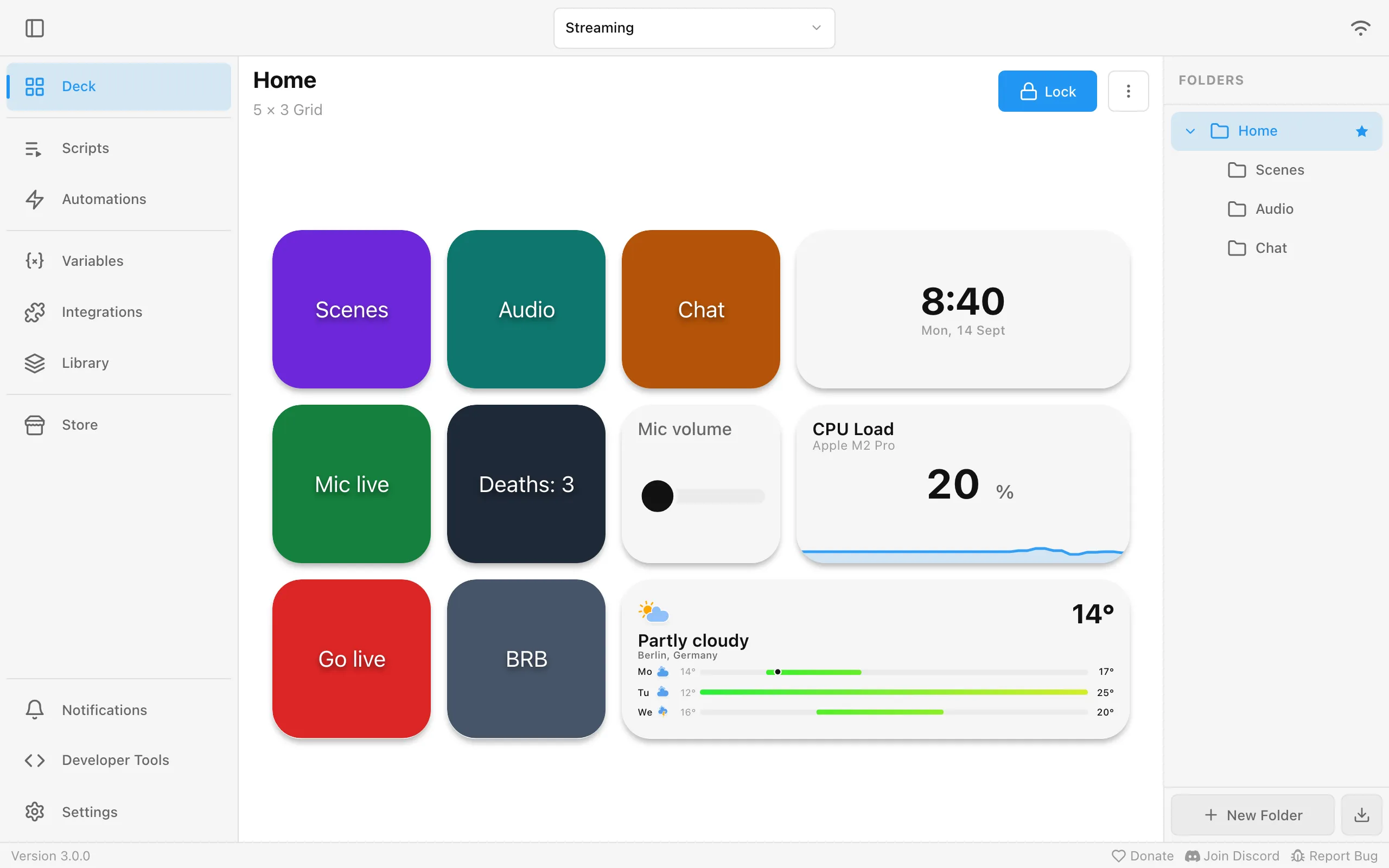
A streaming setup, built up piece by piece.
Profiles
Section titled “Profiles”One profile per use: Streaming, Work, Gaming. A profile holds all its folders and widgets. Switch between them at the top. Each device can open with its own profile.
To build a variant, for example a second streaming layout, duplicate a profile from the profile menu. The copy gets every folder, widget and setting, and is named like Streaming (copy). Automatic activation stays with the original, so set it up again for the copy if you want it.
Edit a profile from the profile menu to set its default grid size, widget spacing and corner radius. Turn Widget shadows off there for a flat deck, which also looks cleaner with very small spacing.
To change the order of your profiles, open the profile menu and drag a profile by its handle, or choose Move Up or Move Down from its More actions menu. A device without a profile of its own opens the first one, and the Companion app’s two-finger swipe follows this order once the app reconnects.
Folders
Section titled “Folders”Inside Streaming: a start folder Home with Scenes, Audio and Chat subfolders, listed on the right. A button with Change Folder to opens a subfolder, Go Back returns.
Change Folder to, Change Profile to, Go to Parent Folder and Go Back have an optional Device setting. A button pressed on a device only moves that device. An automation has no device behind it, so with Device empty it moves every connected device. Pick a device there to move only that one. If it is not connected at that moment, the action reports an error instead of moving the others.
Widgets
Section titled “Widgets”The tiles in a folder:
| Widget | Example |
|---|---|
| Action Button | Scenes, Go live, BRB |
| Slider | Mic volume. Turn on Color thresholds to color it by the range its value is in |
| Clock | The current time and date |
| History Graph | CPU load over the last minutes, green under 50 % and red above 90 % with Color thresholds |
| Gauges | CPU, RAM and GPU load side by side as rings with an icon, like a battery overview. Color thresholds color each ring by its value instead of a single warning |
| Battery | Your phone’s battery, or your phone, headset and controller side by side, colored by how full they are |
| Weather | Today and the next days for your city, or under Style > Compact just the current temperature, the condition and today’s high and low. Press it for the full details |
| Calendar | Today’s date with your next meetings, the next few days on a larger widget, or your next meeting and how long until it starts. Press it for the details |
| Email Inbox | How many unread emails are waiting, or the newest emails with sender and subject, from the email accounts you connected |
| Music Player | What Spotify or Jellyfin is playing, with play and skip. Some players offer extra settings for each widget below the player choice |
| Jellyfin Sessions | What plays on your Jellyfin servers, on whose device, offered once a Jellyfin server is set up |
| Twitch Chat | Your channel’s chat with emotes and badges, offered once a Twitch account is connected |
| Twitch Stream Stats | Whether you are live, your viewers, chatters, followers and subscribers, the stream title, category and uptime, and a small graph, in a style you choose, offered once a Twitch account is connected |
| YouTube Chat | Your live stream’s chat, offered once a YouTube channel is connected |
| YouTube Stream Stats | Whether you are live, your viewers, likes and subscribers, the stream title and uptime, and a small graph, in a style you choose, offered once a YouTube channel is connected |
| Countdown | A pizza timer that counts down and alerts you when it runs out |
| Stopwatch | How long the current segment of your stream has been running |
Labels and text use the fonts installed on your computer, plus any you import under Library > Fonts.
Moderating from the chat widgets
Section titled “Moderating from the chat widgets”Press the Twitch Chat or YouTube Chat widget to open the chat in a larger dialog. It stays at the newest message while you are at the bottom. Scroll up to read, and the chat stops moving; Jump to latest takes you back.
Tap a message to delete it, time out its sender for 1 minute, 10 minutes or 1 hour, ban or unban them. A ban asks you to confirm first. The dialog says whether the action worked, or why Twitch or YouTube refused it:
- Twitch did not grant Macro Deck the permission for this action: reconnect the Twitch account in Integrations to grant the moderation permissions.
- Twitch did not allow this: reconnect the Twitch account in Integrations and try again.
While the computer running Macro Deck is locked, the chat dialog keeps showing the chat, but tapping a message shows that the computer is locked instead of selecting it. Unlock the computer, as for any other action. This applies to Windows and macOS, see Buttons still work while a Linux computer is locked.
On YouTube, Unban only lifts bans you made through Macro Deck during the current broadcast; lift other bans in YouTube Studio. See YouTube.
Your channel’s own messages, and messages that reach your chat from another channel’s Shared Chat, offer no actions; moderate those on Twitch. Anyone who can use your deck can moderate through the dialog. To only show the chat, turn off Allow moderation in the chat dialog in the widget’s settings. Widgets that a plugin places in its own profiles open the chat without moderation. The dialog opens on the device you pressed the widget on, so a press on a hardware deck does not open it.
On a small device or a large widget, change Size (%) in the widget’s settings to make the chat text bigger or smaller. 100 is the default and values from 25 to 300 are accepted. The size applies to the widget; the chat dialog keeps its own.
To make the chat easier to read on your background, pick a Message color for the chat text. Pick a Name color to show every chatter’s name in that one color instead of each chatter’s own color. Reset either one to go back to the theme’s text color or the chatters’ own colors. The widget’s title and its status notices keep the theme’s text color. Like the size, both colors apply to the widget; the chat dialog is not affected.
The Stream Stats widgets
Section titled “The Stream Stats widgets”The Twitch Stream Stats and YouTube Stream Stats widgets work the same way. Pick what the widget shows with Style in its settings. Each style names the size it is designed for, and keeps the same content at any other size, only larger or smaller:
| Style | Shows |
|---|---|
| Overview (3x2) | Your channel name and live status, the stream thumbnail, title, category and uptime, and a row of stat tiles |
| Stats row (3x1) | A row of stat tiles |
| Live status row (3x1) | The live status and category, with one number beside them |
| Single value with graph (2x2) | One number, the live status and a graph of that number |
| Single value (1x1) | One number with a live dot |
For the Overview and the Stats row, Stats chooses which tiles appear and in which order: drag a row or use its arrows. Twitch offers viewers, chatters, followers and subscribers, with the first three on by default. YouTube offers viewers, likes and subscribers, all on by default. Four tiles fit best in a widget one column wider than the style’s size. The Overview also has Stream details, which chooses and orders the title, category (Twitch only) and uptime next to the thumbnail, and Show thumbnail. For the other three styles, Value chooses the number they show.
The graph follows the chosen number. It starts when the widget is first shown and begins again after Macro Deck restarts, so it fills over time; followers and subscribers change slowly, so their graph often stays flat. Offline, viewers and chatters show a dash, while followers and subscribers stay. Subscribers also show a dash while Twitch does not report them to Macro Deck. On YouTube, viewers and likes show a dash offline, and viewers and subscribers also while you hide those counts on YouTube. The Live status row shows the stream title instead of the category.
Everything the widget shows is also a regular variable of the Twitch integration, named
twitch_<account>_viewer_count, twitch_<account>_chatter_count, twitch_<account>_follower_count,
twitch_<account>_subscriber_count, twitch_<account>_display_name, twitch_<account>_stream_title,
twitch_<account>_stream_category, twitch_<account>_uptime_seconds, twitch_<account>_is_live and
twitch_<account>_stream_thumbnail_url. Use them in your own widgets, actions
and conditions. The chatter count is everyone in your chat, including you and bots, and needs one more
permission: if Integrations shows that the account lacks it, reconnect the Twitch account. The YouTube
variables are listed on the YouTube page.
Countdown and Stopwatch
Section titled “Countdown and Stopwatch”A Countdown counts down from a duration you set in its settings. Tap it to start, tap again to pause and again to continue; hold it to reset it. When the time runs out the widget turns red with a pulsing ring until you tap it, which also resets it.
Set When started to Ask for the duration to choose the time each time instead. Tapping the idle countdown then opens a dialog with quick choices from 1 minute to 1 hour, or hours, minutes and seconds to set yourself. After a reset, or once a finished countdown was tapped, the next tap asks again. The dialog opens on the device you tapped. A hardware deck cannot show it, so a press there starts the duration entered last and does nothing until one was entered.
A Stopwatch starts on a tap, pauses on the next and continues on the one after. Hold it to set it back to zero. Its ring goes round once a minute.
Both widgets offer their own triggers in the widget editor, so actions can run when something happens:
| Widget | Triggers |
|---|---|
| Countdown | Started (also when it continues), Paused, Reset, Time’s Up, Dismissed |
| Stopwatch | Started (also when it continues), Paused, Reset |
They also keep variables of their own, which the widget’s own actions can use, for example in If / Else or a Set Variable that copies the time into one of your variables:
| Widget | Variables |
|---|---|
| Countdown | countdown_remaining_seconds, countdown_running, countdown_finished |
| Stopwatch | stopwatch_elapsed_seconds, stopwatch_running |
These change every second while a timer runs, so an automation on Variable Changed without a filter runs every second too. A running countdown or stopwatch starts over when Macro Deck restarts. On a hardware deck, the key shows the widget’s label and colors but not the time.
Calendar widget
Section titled “Calendar widget”The Calendar widget shows the events of the calendars you connected under Integrations, for example Google Calendar or Outlook Calendar. Until a calendar is connected it says No calendar connected. Each event is marked in its calendar’s color. Its Layout decides what it shows: Agenda, the default, lists your upcoming events, and Next event counts down to the next one. The settings change with the layout, so you only see the ones that apply.
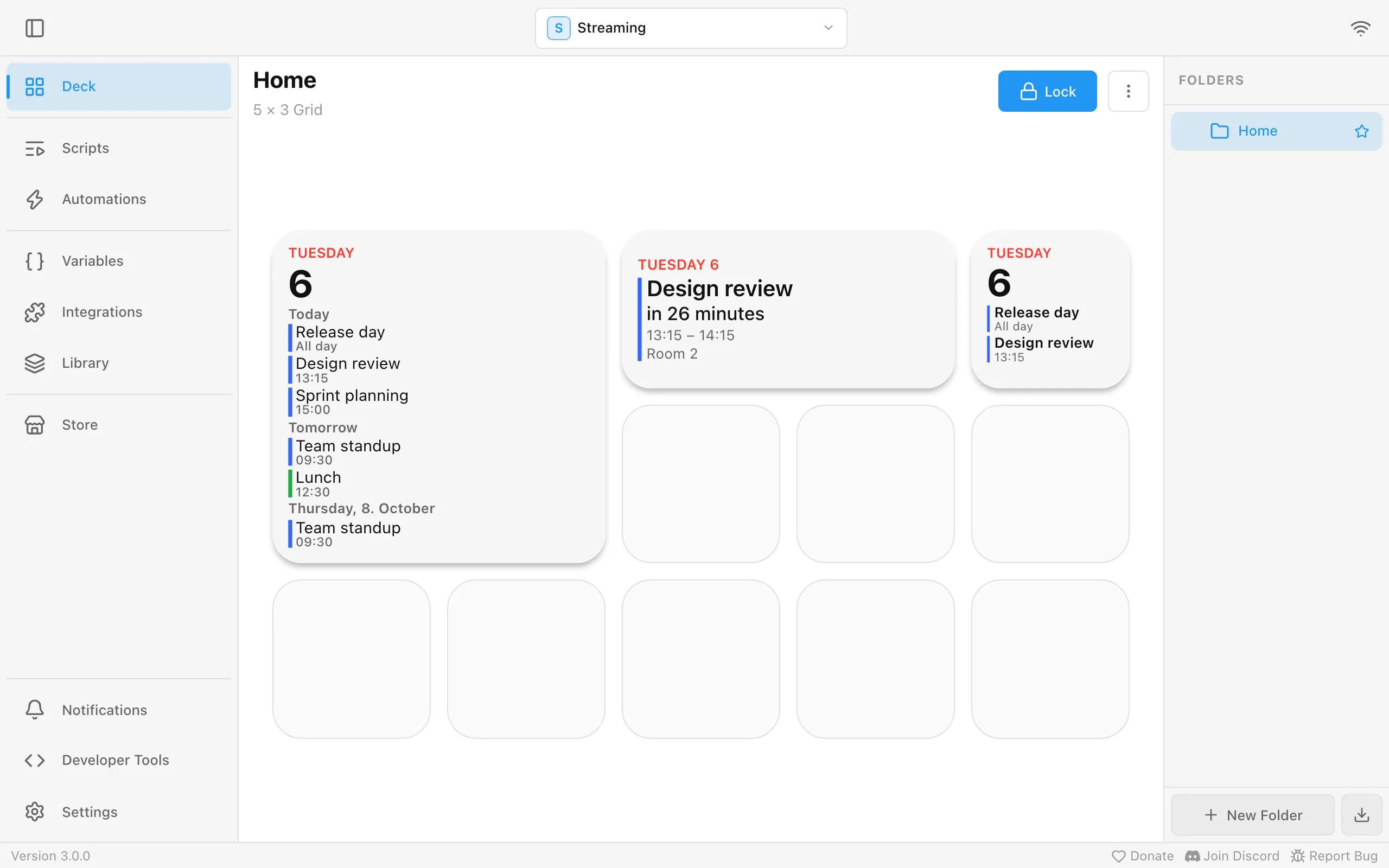
With Show date on, which it is by default, the widget looks like a calendar on a phone’s home screen: the weekday in small red capitals above a large day of the month, in Macro Deck’s language. On a 1x1 Agenda, the date sits above the next two events, each with its title and time; when nothing is left today it says No more events today, or No upcoming events if its Days reach past today and nothing is planned. A 2x1 Agenda puts the date on the left and up to four events on the right, and from 2x2 on the date heads a section for each day. A Next event layout shows the weekday and date in a small red line on top. Turn Show date off for the plain list.
Without the date, an Agenda smaller than 2x2 lists the next events within its Days, up to four, with the day in front of events after today; one cell wide, the time sits above each title. From 2x2 on, it shows a section for each day, headed Today, Tomorrow and then the weekday and date, with up to six events a day. Events that have ended leave the list. The widget’s settings:
| Setting | What it does |
|---|---|
| Layout | Agenda or Next event. |
| Calendars | The calendars to show, each listed with its account and provider. Leave it empty for every calendar, including ones you connect later. |
| Days | How many days ahead, from 1 to 7, the agenda looks, picked from a list. Agenda only. |
| Event Starts Soon lead time | How long before an event starts the widget’s own Event Starts Soon trigger runs, from 1 minute to 1 hour, picked from a list. 15 minutes by default. |
| Show date | Shows today’s weekday and date. On by default. |
| Show all-day events | Lists all-day events, such as holidays or a day off. A new widget starts with it on for an Agenda and off for Next event; once saved, it keeps its value when you change the layout. |
| Show time, Show location, Show calendar name | What each event shows besides its title. Agenda only. |
The Next event layout shows the next event’s title, how long until it starts, for example in 25 minutes or in 5 days, and its time and location; one cell wide, it shows only the title and how long until it starts. It adds When an event has started: Keep showing it until it ends shows Now for the running event, while Show the next event moves on as soon as an event starts.
The details dialog shows when an event is, its calendar, account and provider, the location, the description and who is invited, with their answers. A very long description is shortened, and the dialog lists the first 100 people invited. Join meeting opens the meeting link on the computer running Macro Deck, not on the device you pressed. While that computer is locked, Macro Deck refuses to open the link on Windows and macOS, but not on Linux, see Buttons still work while a Linux computer is locked. The dialog opens on the device you pressed.
Press a calendar widget in the Next event layout to open the details of the event it shows. Press an Agenda to open a dialog that lists its upcoming events by day, for its Calendars, Days and Show all-day events; press an event there to see its details in the same dialog, and Back to return to the list. The list shows up to 50 events and says how many more are coming up after them. The list follows your calendars while it is open, and says This calendar widget no longer exists. once the widget is deleted. Give the widget a Short Press action of your own and yours runs instead.
The widget takes actions in the widget editor like a button, in either layout, on Short Press, Long Press, Touch Start, Touch End and Double Tap, and offer three triggers of their own under Add trigger:
| Trigger | Runs |
|---|---|
| Event Starts Soon | The widget’s Event Starts Soon lead time before an event starts. |
| Event Started | When an event starts. |
| Event Ended | When an event ends. |
They run for the events in the widget’s Calendars, all-day events only with Show all-day events
on, and follow the same rules as the Calendar triggers: each runs
once per event, and an event that started or ended while Macro Deck was off, or more than a few minutes
ago, does not run them afterwards. Their actions can use the event’s values with the same names, such as
{{ event.title }}. The Calendar events under + Add event trigger are the general Calendar
triggers instead: they ignore the widget’s calendars and lead time and have their own Account,
Calendar and Lead time.
The Show Calendar Details action, under Calendar, opens the same dialog as a press, for example on a Long Press: the details of the event the Next event layout shows, or an Agenda’s list of events. It works in a calendar widget’s own actions only. In the Next event layout it fails with The widget shows no event right now. when there is none; an Agenda without upcoming events still opens its list, which says No events.
The widget also keeps variables of its own about the event it shows: the event of the Next event layout, or the first event an Agenda lists, so they change when you switch the layout. The widget’s own actions can use them, for example in If / Else:
| Variable | Holds |
|---|---|
calendar_next_title |
The event’s title. |
calendar_next_start, calendar_next_end |
Date and time in the local time of the computer running Macro Deck, such as 2026-10-05T09:00:00.0000000+02:00. |
calendar_next_countdown |
How long until it starts, as the widget says it, such as in 30 minutes, or Now while it runs, in the language Macro Deck is set to. |
calendar_next_minutes |
Minutes until it starts, rounded up, and 0 while it runs. |
calendar_next_running |
Whether it is running. |
calendar_next_location, calendar_next_meeting_url |
Its location and meeting link. Empty when the event has none. |
calendar_next_calendar |
The name of its calendar. |
While the widget shows no event, these variables do not exist, so a condition can check them with is not available. The countdown and the minutes change once a minute while an event is coming up, so an automation on Variable Changed without a filter runs every minute too.
A hardware deck has no screen for these dialogs, so pressing a calendar widget there runs only your own press actions and does nothing without them. To join a meeting from a key, give it the Join Meeting action.
Macro Deck reads your calendars every five minutes, so a new event can take a moment to appear; the Refresh Calendars action, under Calendar, reads them right away and fails with Some calendars couldn’t be updated when an account cannot be read. It reads about a week ahead, from yesterday through the day a week from today: the Next event layout says No upcoming events when nothing is planned in that time, even if a later event exists. When an account cannot be read, the widgets keep its last events and say Some calendars couldn’t be updated; check that account’s integration under Integrations.
Everything these widgets show, including the descriptions and participants in the details dialog, can be seen on every device connected to your Macro Deck. Keep calendar widgets off profiles that devices you don’t trust use.
A profile with calendar widgets that you import into a Macro Deck version without calendar support shows those widgets as not available.
Email Inbox widget
Section titled “Email Inbox widget”The Email Inbox widget shows the inboxes you connected under Integrations, for example with IMAP. Until an inbox is connected it says No email inbox connected. It only reads: it never marks an email as read, moves or deletes it.
Show decides what it shows. Unread count, the default, shows the number of unread emails across its inboxes in large type under a mail icon, with the inbox’s name, or All Inboxes for several, below it. Message list shows the newest emails under a header with the same name and a blue badge with the number of unread emails, which disappears when nothing is unread. Unread emails have a blue dot and a bold sender. Each email shows its sender and time on the first line, its subject below and, if you turn it on, the first words of the email. The time is the time of day for today, Yesterday, the weekday during the last week and the date before that. Above 999 the count shows 999+, and until the first inbox has been read it shows a dash.
The size decides the layout. Unread count puts the mail icon beside the number on a tile at least 1.5 cells wide but shorter than 1.5 cells, and above it everywhere else. A Message list shows as many emails as fit the tile, up to Emails shown: on a tile narrower than 1.5 cells it shows the newest ones compactly, from 1.5 by 1.5 cells as a full list with the preview on up to two lines, and wide but short as one line per email. A list with nothing to show says No emails, or No unread emails with Only unread emails on. The widget’s settings:
| Setting | What it does |
|---|---|
| Inboxes | The inboxes to show, each listed with its provider, such as Work (IMAP). Leave it empty for every inbox, including ones you connect later. |
| Show | Unread count or Message list. |
| Only unread emails | Lists only unread emails, the newest first. Message list only. |
| Emails shown | The most emails the list shows, from 1 to 10, 5 by default. A tile too small for all of them shows as many as fit. Message list only. |
| Show sender, Show subject, Show preview, Show time received | What each email shows. Sender, subject and time are on by default, the preview, the first words of the email, is off. Message list only. |
When an inbox cannot be reached, the widget keeps its last emails and adds a warning: Offline under the count, a warning sign beside the header of a small list, Can’t reach this inbox right now under a full list, or Some inboxes can’t be reached right now when only some of its inboxes are affected. Check the account under Integrations, see Troubleshooting.
New emails show up within seconds when the mail server reports them, and otherwise after a few minutes. The Refresh Email Inboxes action, under Email, checks every inbox right away.
Everything the widget shows, including senders, subjects and previews, can be seen on every device connected to your Macro Deck. Keep email widgets off profiles that devices you don’t trust use.
Gauges
Section titled “Gauges”A Gauges widget shows up to eight numbers as rings, each with an icon in the middle and its value and an optional name below. A new one starts with CPU and RAM. The rings arrange themselves for the tile: four of them sit in two rows on a square tile and in one row on a wide one.
In the widget’s settings, pick the ring to edit from the list under Gauges. Add gauge adds an empty one, Delete removes the one you picked, and Presets add a ready ring for CPU, RAM or GPU. A full widget hides the presets. For the ring you picked:
- Choose a Variable with a number and a Name. The name can include variables, for example the processor’s model under its CPU ring.
- Icon opens the icon picker. Macro Deck ships the read-only Included pack with icons for CPU, memory, graphics card, drives, network, battery, temperature, fans, audio and more; any other icon pack works too. Icon Color recolors the icon.
- Minimum and Maximum set the values of an empty and a full ring. With Maximum at 0 the ring uses the variable’s own maximum, otherwise the minimum plus 100.
- Ring color colors the ring; without one it follows your accent color. Warning turns the ring red at or above, or at or below, a Threshold, for example a CPU that runs hot or a battery that runs low.
Style draws every ring of the widget as a full Ring or as an open Arc.
Battery
Section titled “Battery”A Battery widget shows the charge of your devices: one device, all of them (a new widget starts with all), or the ones you pick, up to eight on one widget. Each device is a ring or a bar with its icon, its level and, if you like, its name. On a wide tile a single device gets a large ring with its name and state next to it; several devices arrange themselves for the tile, as rings side by side or as a list of bars on a tall one.
The color follows the level, from red when the battery is nearly empty through orange and yellow to green, and you can move those limits under Color thresholds. A charging device turns light blue and shows a lightning bolt beside its level. Turn off Charging color to keep the level colors while charging, turn off Show charging indicator to hide the bolt, or pick Single color to give the widget one color of your own.
- A device that reports no level shows –.
- A device that is out of reach, for example an unplugged phone, keeps its name and is shown as not connected.
- A device whose app, plugin or integration is not running, or is turned off, shows its last name as not available until it is back.
Which devices are offered:
- Android phones and tablets, once Enable ADB is on under Settings > ADB, the ADB / Android Debug Bridge integration is turned on under Integrations, and the device has allowed USB debugging for this computer (see Connect over USB). A phone you unplug stays in the list as not connected.
- Phones and tablets running Macro Deck Companion, once they reported a battery level and the Macro Deck Companion integration is turned on under Integrations. Each is listed under the name of its Companion configuration and stays in the list as not connected when the app disconnects, until Macro Deck restarts; deleting the configuration removes it. Deleting the last one turns the integration off, so that device is shown as not available instead. The app reports only whether the device is charging, so a device plugged in but not charging reads as discharging. An Android phone connected over ADB that also runs the Companion app is listed twice, once for each integration; pick either.
- This computer’s battery, on a laptop, while the System integration is turned on. It is listed under the computer’s name and checked every 15 seconds. A computer without a battery adds nothing.
- Home Assistant battery sensors you pick. When you set up or reconfigure Home Assistant under Integrations, the step Choose battery sensors lists every battery sensor of your Home Assistant; check the ones you want, up to 64. Each is listed under its Home Assistant device’s name, and shows as charging when the device also has a battery charging sensor that is on. A sensor that is unavailable, or every sensor while Home Assistant is unreachable, shows as not connected. Unchecking a sensor removes it; a sensor renamed in Home Assistant has to be picked again. Deleting the Home Assistant configuration turns the integration off, so its sensors are shown as not available.
- Devices from plugins, such as headsets, controllers or mice, when a plugin you installed reports them.
Every device also gets battery variables, seven per device.
Actions and triggers
Section titled “Actions and triggers”What a widget does, and when. The Scenes button runs Change Folder to on a short press:
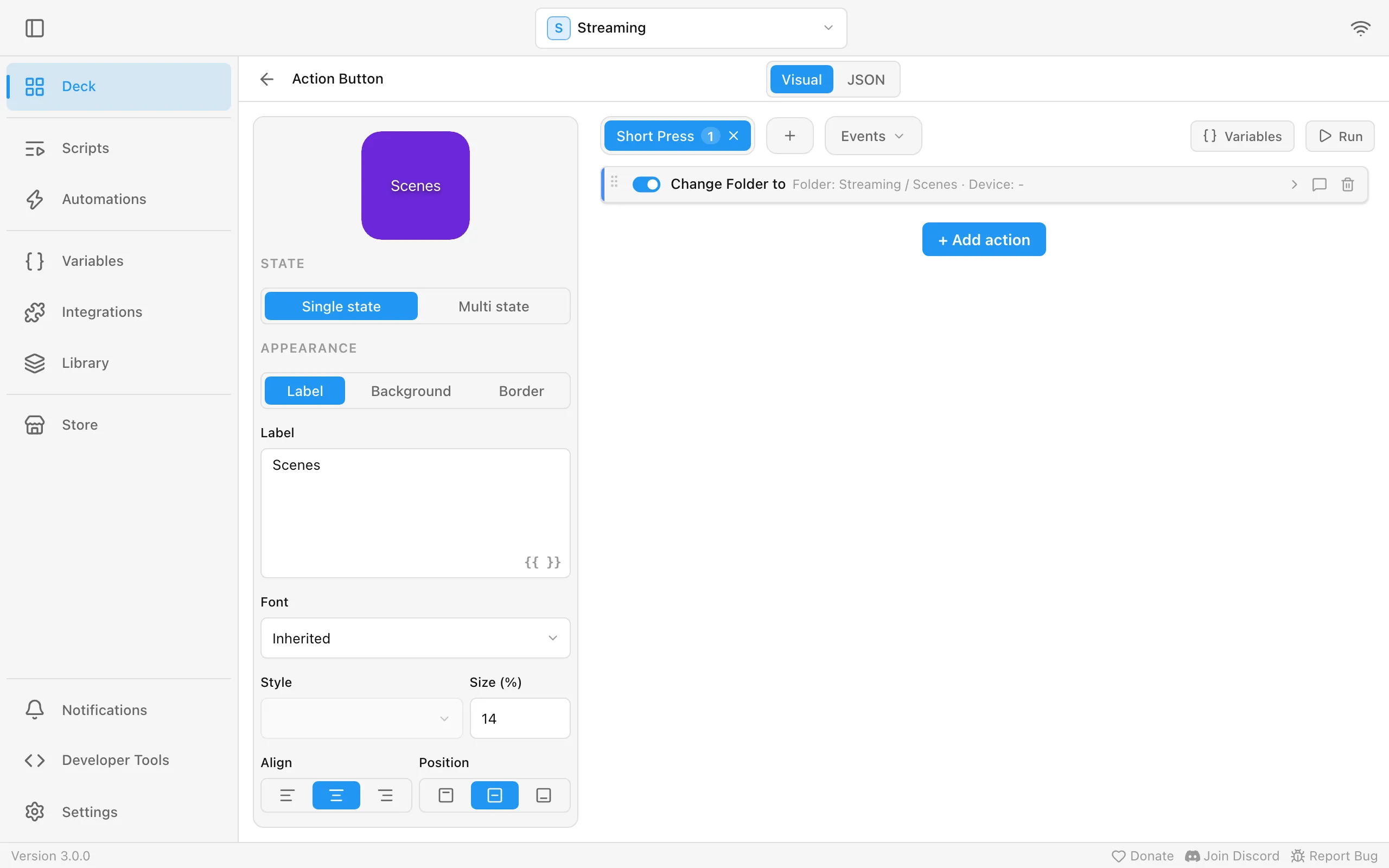
| Trigger | Example action |
|---|---|
| Short Press | Switch OBS scene |
| Long Press | Start the stream |
| Double Tap | Mute all audio |
| Event | Turn the mic slider’s accent red when OBS reports Streaming Started |
Some widgets already do something on a short press before you add anything: pressing a Weather widget opens its details (for a location from a plugin, only when that plugin offers details), and a Calendar widget its list of events or the details of its next event. Give such a widget a Short Press action of your own and yours runs instead. A hardware deck has no screen for these details, so these widgets do nothing there until you add an action.
Every widget with actions, sliders included, can add event triggers next to its press triggers. Give an event trigger a Name to tell several of them apart in the Events list.
Once a widget has a Double Tap action, its Short Press waits a moment to see whether a second tap follows, so a single tap runs slightly later. A double tap runs only the Double Tap action. On a slider, a double tap still moves the level with each tap, and the tile flashes like a pressed button once the double tap is recognised.
Actions run top to bottom. If / Else, Switch, Repeat and Wait build longer flows, for example: mute the mic, wait 3 seconds, switch the scene. Run tries them out right away.
Switch picks one path by a value, so a single block replaces a chain of If / Else blocks. Put the value
to look at in Switch on, usually a variable, then add a Case for each value you care about and the
actions to run for it. The cases are checked from top to bottom and only the first match runs. Otherwise
runs when no case matches or the variable you picked has no value. Matching works like If / Else with is: text must match exactly, so
all does not match All, while numbers compare by value.
Button states
Section titled “Button states”The Mic button has two states, Live and Muted, each with its own label and color. Every tap switches to the next one.
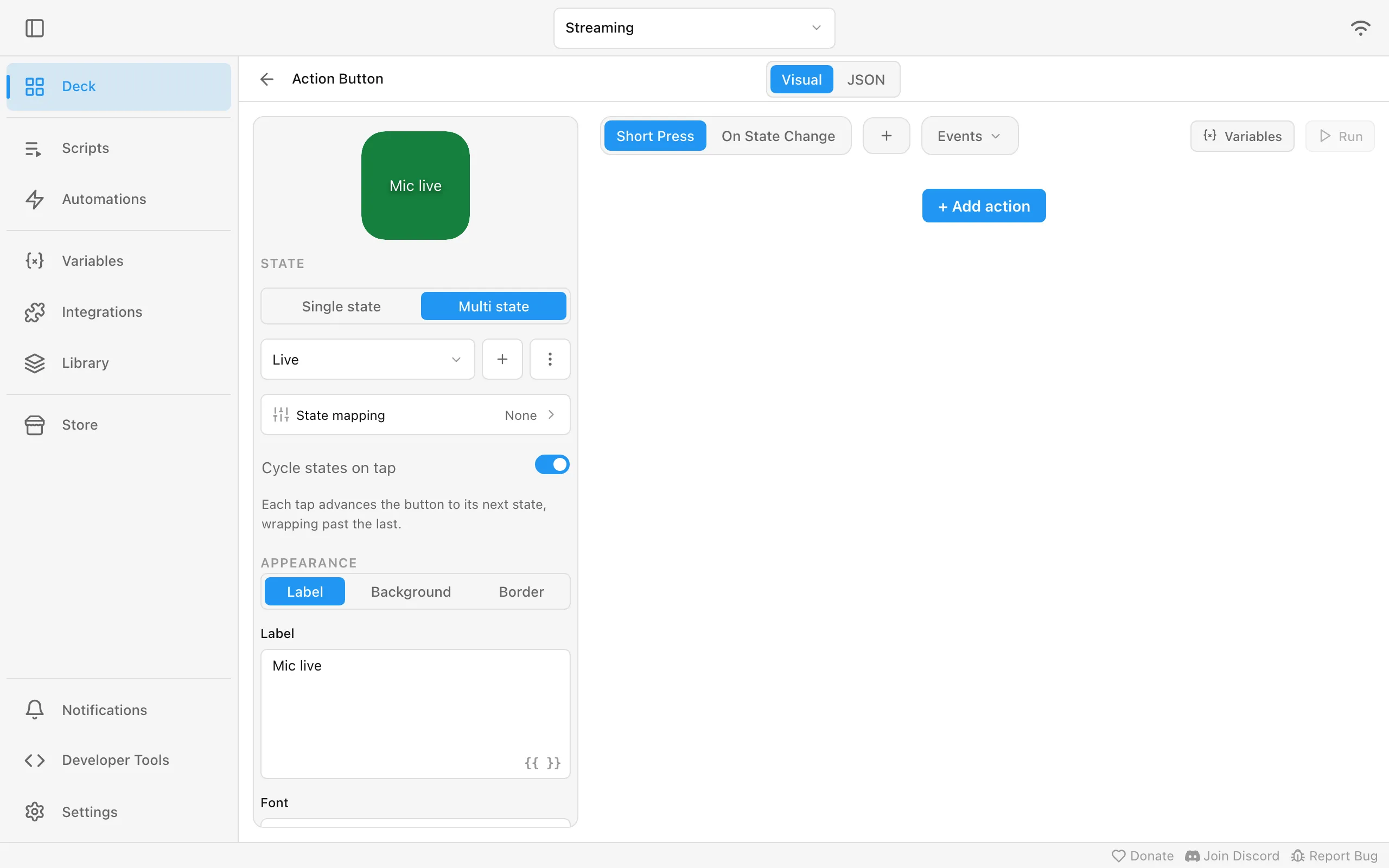
With State mapping, the state follows a variable instead, for example Discord’s Self Muted. The button then shows the truth even when you mute in Discord itself.
Some actions know their own state, for example Mute / Unmute or OBS’s scene actions. The action list marks them, and each one gets a button to let it drive this button’s states. When you add such an action, the editor offers this right away. The action then decides which states exist, and you still style each of them. The × next to Provided by brings your own states back. Plugin actions that supply an icon work the same way for the button’s icon.
Icon appearances
Section titled “Icon appearances”An icon can have more than one appearance: a light and a dark version, or an animated icon and a still version of it. It stays one icon in Library > Icon Packs and in the icon picker, and Macro Deck shows the appearance that fits:
- Light or Dark follows the theme of the screen showing the deck: the Macro Deck app, the deck you open in a browser and the Companion app. With the theme set to System, each of them follows its own device’s setting.
- Static is shown where the system asks for reduced motion, and Animated everywhere else. In the Companion app that is Remove animations on Android and Reduce Motion on iPhone and iPad. An animated icon without a static appearance keeps playing.
- A device that can’t play animations, such as some stream controllers, shows the Static appearance when there is one.
- When no appearance fits, the icon’s own image, the Default, is shown.
Icons with appearances have a layered mark in the corner. Double-click an icon, or right-click it and choose Appearances…, to see them. There you add an appearance from an image file, replace or remove one, or use an existing icon from the same pack as an appearance. That icon then disappears from the pack, and buttons and actions that used it switch to the icon it became part of. Appearances of icons in Store and plugin packs come with the pack and can’t be changed.
Besides these, you can name appearances yourself, for example Filled, Outlined, Monochrome or Red. In the Appearances… dialog choose Add appearance > Custom appearance…, type a name and pick the image. Macro Deck never switches to a custom appearance by itself: you pick it on a button or slider, or with the Set Icon Appearance action. Use Latin letters and digits for the name; letters with accents are shown without them (Gefüllt becomes Gefullt), and names in other scripts are not supported yet. An icon holds at most eight appearances in total.
To always show one appearance on a button or slider, pick it under Icon appearance next to the icon. Automatic goes back to choosing by theme and motion. A flow can switch it with the Set Icon Appearance action.
When you import images, files named like play.png, play.dark.png and play.static.gif in the same folder
become one icon play with a dark and a static appearance. The words light, dark, static and animated
work this way, also combined, as in play.dark.static.png. Other names import as separate icons as before.
Appearances travel with the icon when you export a pack or a profile. A Macro Deck version without appearances shows only the default images, and if you go back to such a version, its icon packs lose their appearances.
Variables
Section titled “Variables”Values you can show and use anywhere:
- Integration variables: the CPU load, the date, the weather, the current OBS scene.
- User variables: your own, for example a
deathscounter.
Show one in a label with {{ vars.deaths }}, like the Deaths: 3 button above.
A variable that is unavailable, for example while its integration is offline, shows n/v. So does a
label that cannot be shown, such as {{ vars.cpu | round: 1 }} while cpu is unavailable or a
template with a typo; the other buttons on the page keep updating.
A user variable is Text, Numeric, Boolean or Color. A Color variable holds a color such as
#3366ff that widgets, folder backgrounds and the accent color can follow, see
Colors from a variable.
Every speaker and microphone gets its own volume and mute variable, named after the device, for
example system_audio_input_usb_mic_volume_percent. An unplugged device keeps its variables; they
read as unavailable until it is back. Macro Deck remembers up to 64 devices; after that, the oldest
unplugged device makes room. The volume actions can control the default output, the default
input or one specific device.
The default devices have their own pair: system_volume_percent and system_muted for the output,
system_input_volume_percent and system_input_muted for the input. You can set any of these volume
and mute variables with Set Variable, or on the Variables page with Edit value for a volume and
Toggle value for a mute variable. A volume takes a percentage, and a mute variable mutes the device
when set to true and unmutes it when set to false. To switch between muted and unmuted with one button, use the Mute / Unmute action, because
Set Variable cannot toggle a variable that belongs to an integration.
Every disk gets numbered variables too: system_disk_0_* is the system disk (the drive Windows runs
from, or / on macOS and Linux), and the others follow, up to eight. Each disk has:
| Variable | Shows |
|---|---|
system_disk_0_name, _mount_point, _file_system |
The disk’s name, where it is mounted (for example C:\ or /Volumes/Backup) and its file system. |
system_disk_0_total_bytes, _used_bytes, _free_bytes, _usage_percent |
Its size, the space in use, the space still free for you, and how full it is. The numbers match Finder and Explorer: space the system keeps in reserve counts as used. |
system_disk_0_read_bytes_per_second, _write_bytes_per_second |
How fast it is reading and writing right now. |
system_disk_0_read_usage_percent, _write_usage_percent |
How busy it is with reading and with writing. A fast SSD handling many requests at once reaches 100 % quickly. |
A disk you plug in while Macro Deck runs gets the lowest free number within a few seconds. A disk you remove keeps its variables; they read as unavailable until a disk takes its number again. After a restart the numbering starts over, so a removable disk can end up with a different number. Network drives and hidden system volumes are left out. On macOS, read and write figures come from the physical disk, so all volumes on one disk show the same activity. Linux shows no activity for ZFS pools.
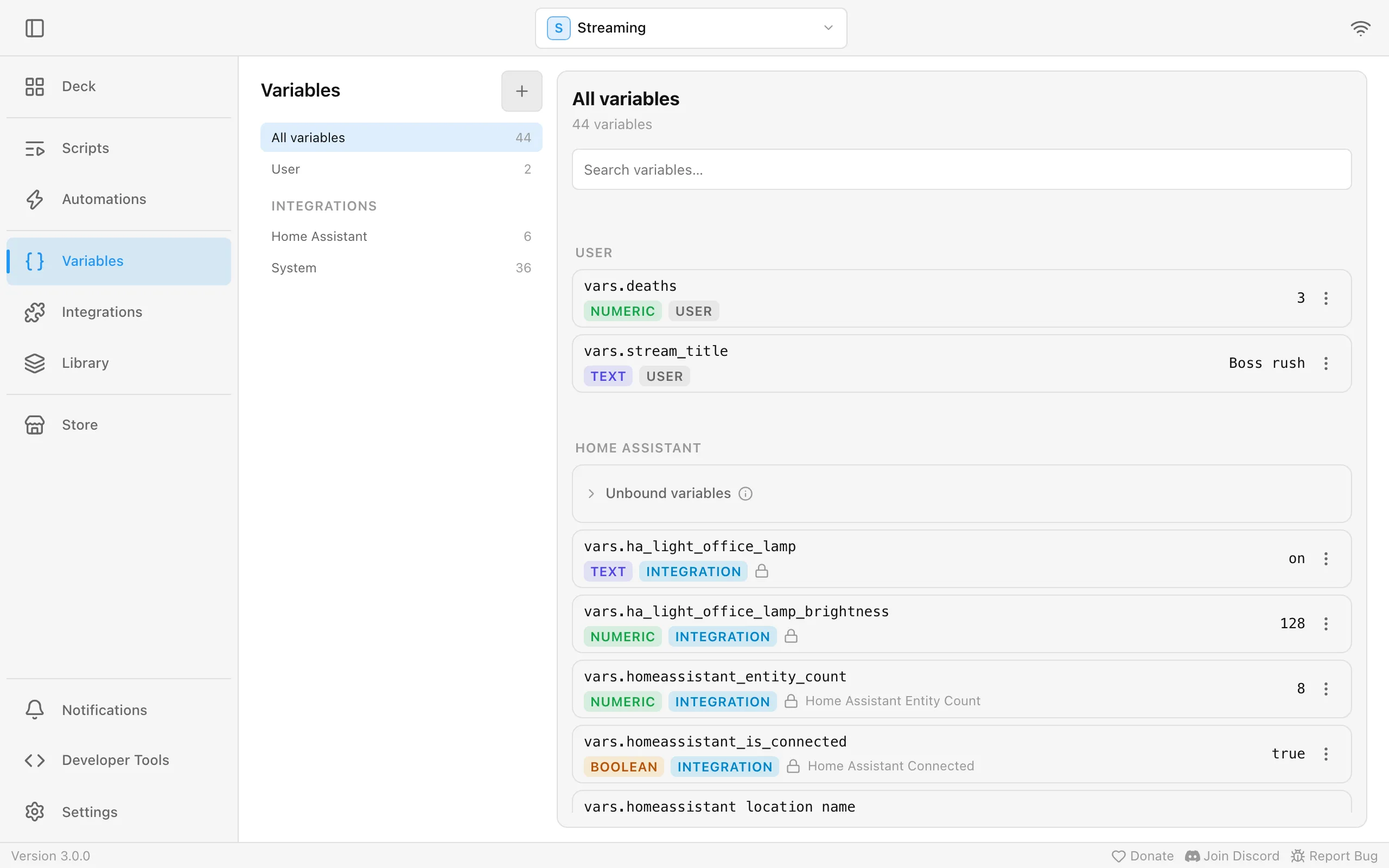
Some integrations, such as Home Assistant, offer far more values than they list up front. These wait
in a collapsed Unbound variables group at the top of the integration’s variables, on the Variables
page, in every variable picker and on the integration’s own page. Open the group, or search for an
entity by name or variable name, then open an entity to see its state and attributes and choose
Bind on the one you want: it becomes a normal variable. If you know the entity id, for example
light.office_lamp or light.office_lamp/brightness, pick the integration in the variable browser and
type it under Enter a resource ID instead.
A Slider can control Home Assistant too. In the slider’s Variable field, open Unbound variables under Home Assistant, then the entity, and pick the value to adjust:
| Entity | Value to pick |
|---|---|
| Light | brightness_pct, the brightness in percent, or color_temp_kelvin |
| Fan | percentage |
| Cover, valve | current_position, and current_tilt_position for a cover |
| Media player | volume_level |
| Thermostat, water heater | temperature |
| Thermostat, humidifier | humidity |
| Number, number helper | state |
The slider shows the value Home Assistant reports and sends the new one when you let go. Dragging a light to zero turns it off, and dragging a light that is off turns it on. An entity with nothing to adjust right now, such as a media player in standby, ignores the slider. A value you bound before as Text is not offered: remove that variable and bind the value again.
A user variable can also read from a file, like OBS’s Read from file: choose Read from file as its source when you create it and pick the file. The variable shows the file’s content and follows every change another program or script makes to it. A trailing line break is ignored, and a number or true/false variable needs content of that kind. While the file is missing, unreadable or does not fit, the variable reads as unavailable.
Such a variable is read-only. Turn on Allow write-back to let changes made in Macro Deck, for example with a slider or Set Variable, go into the file too. File settings in the variable’s menu changes the file or write-back later. When you export widgets, a variable that reads from a file travels as an empty variable: neither its path nor the file’s content goes into the archive. Macro Deck watches the file for changes; a file on a network share may not report them.
To save any variable’s value on demand, use the Write Variable to File action. It replaces the file’s content with the current value, creates the file if needed, and needs a full path whose folder exists.
Only your own variables can read from a file. To keep a file up to date with any other variable, for
example the current OBS scene or system_cpu_usage_percent, create an automation: the event
Variable Changed watching that variable runs Write Variable to File for the same variable.
Every change then lands in the file.
Variables of a widget, script or automation
Section titled “Variables of a widget, script or automation”The variables on the Variables page are global: every button, script and automation sees them. A widget, a script and an automation can also have variables of their own, which nothing else sees. Open one in its editor and choose Variables in the toolbar of its actions (Variables of this widget, Variables of this script or Variables of this automation). The panel lists its own variables under Widget variables, Script variables or Automation variables, and you add, edit and remove them there. In a variable picker they appear under This widget, This script or This automation. A new script or automation has no Variables button until you save it once.
An own variable with the same name as a global one hides the global one there, so a count of a script
is a different variable from the global count, and Set Variable inside the script changes the
script’s. Which count a step sees:
- In a widget’s actions: the widget’s own, then the global one.
- In a script: the script’s inputs, then the script’s own variables, then, for a script that runs on a widget, that widget’s variables, then the global one.
- In an automation: the automation’s own, then the global one.
A script started with Run Script sees only its own variables, not those of the script, widget or automation that started it; pass values to it as inputs instead.
Deleting a widget, script or automation deletes its variables, and duplicating one copies them. When you export or share widgets, the scripts they use bring their variables along. The Variables page still lists only global variables.
Battery variables
Section titled “Battery variables”Every device a Battery widget can show gets seven variables, named after the device, for
example battery_pixel_8_3f9a1c2e_level. They belong to the integration or plugin that reports the device,
so on the Variables page an Android phone’s variables are listed under ADB / Android Debug Bridge
and a headset’s under the plugin that reports it:
_level: the charge in percent, with the unit%._charging: whether the device charges._connected: whether the device is reachable._state:charging,discharging,full,not-charging(plugged in but not charging) orunknown, anddisconnectedwhile the device is not connected or not available._time_remaining_minutes: how many minutes the battery lasts, rounded up._time_to_full_minutes: how many minutes until the battery is full, rounded up._health: what the battery reports about its condition:good,overheat,dead,over-voltage,cold,failureorunknown.
The two time variables read 0 when the device does not report the time, and while it is not connected or
not available. While Macro Deck runs, the names stay the same when the device is renamed; after a restart
they follow the device’s name at that time. When a device is not connected or not available, for example
while ADB is off, _connected and _charging are false, _state reads disconnected, and _level keeps
the last level that was reported, so check _connected before you rely on the level. While a device is not
available, _health also keeps the last value that was reported. Some devices never report a level; their _level reads 0 even while they are
connected, so a rule such as “below 20” would fire for them. The variables are deleted when the device is
removed for good, for example by the plugin that reported it, and when you uninstall that plugin. After
Macro Deck restarts, they come back as soon as the device is reported again.
Template variables
Section titled “Template variables”A template variable combines other variables, text and filters into a new variable. Choose
From template as the source when you create a variable, pick its type and write the template in the
same syntax labels use, for example CPU: {{ vars.system_cpu_usage_percent }}% or
{{ vars.weather_temperature }} °C - {{ vars.weather_condition }}. Below the field you see the value the
variable would get. The {{ }} button opens the template editor, which lists your variables, filters
and logic blocks to insert and previews the result. While you type there, it suggests variables after
{{ or vars., filters after | and logic blocks such as if or for after {%.
The value follows every change to the variables the template reads, including other template variables:
with template_status reading template_temperature_text, which reads weather_temperature, a new
temperature updates both. A template variable announces a change, for example to Variable Changed,
only when its value really changes. Template settings in the variable’s menu changes the template or
the decimal places later; to change the type, create the variable again.
The type is checked: a Numeric variable needs a number with a dot as the decimal separator, a
Boolean variable needs true, false, 1 or 0, a Color variable a color such as #FF8800. While the template produces something else or
cannot be rendered, the variable reads as unavailable and its row says why. A template that reads its
own variable, directly or through other template variables, is refused, and if a later change closes
such a loop, the variables in it read as unavailable until the loop is gone.
Some things to know:
- A template variable is read-only: Set Variable, sliders and plugins cannot write to it.
- Templates are rendered again only when a variable they read changes. A template with the current time does not tick on its own.
- After a start, a template that reads a plugin’s variables shows empty values until the plugin is ready, and then updates.
- An automation that writes a variable whenever a template variable reading it changes is a loop Macro Deck cannot see. Avoid it.
- When you export widgets, a template variable travels as its template and renders again after import.
Share variables with another Macro Deck
Section titled “Share variables with another Macro Deck”With Macro Deck Delegate, one Macro Deck can use the variables of another one, for example to show on your streaming PC whether OBS on your gaming PC is live. Both sides have to agree:
- On the Macro Deck that has the variable, open the variable’s menu on the Variables page and choose Share with other Macro Decks. Any global variable can be shared, your own and integration variables alike. Shared variables are marked Shared; Stop sharing in the same menu takes it back.
- On the other Macro Deck, add or edit the Macro Deck Delegate connection to it and turn on Import shared variables. It is off by default.
The shared variables then appear there under the other computer’s name, so
obs_streaming shared by a computer called Gaming-PC becomes {{ vars.gaming_pc_obs_streaming }}.
Sharing and unsharing show up within a few seconds, without a restart. While the other Macro Deck is off
or cannot be reached, its variables read as unavailable; once it is back, they catch up within a few
minutes at most. If a name is already taken by another variable, or is longer than 64 characters with the
computer’s name in front, that variable is left out, and the connection shows a warning listing it.
A shared variable that can be changed on its own Macro Deck can be changed from the other one too, for example with a slider or Set Variable, so anyone who can change variables on the importing Macro Deck can change it. A Macro Deck from before variable sharing simply shares nothing.
Scripts and automations
Section titled “Scripts and automations”- Script: actions you reuse, for example Go live used by three buttons. Any device signed in to Macro Deck can also list and run every script that does not run on a widget, with its own input values. Macro Deck Companion does this from Shortcuts or Siri on iOS.
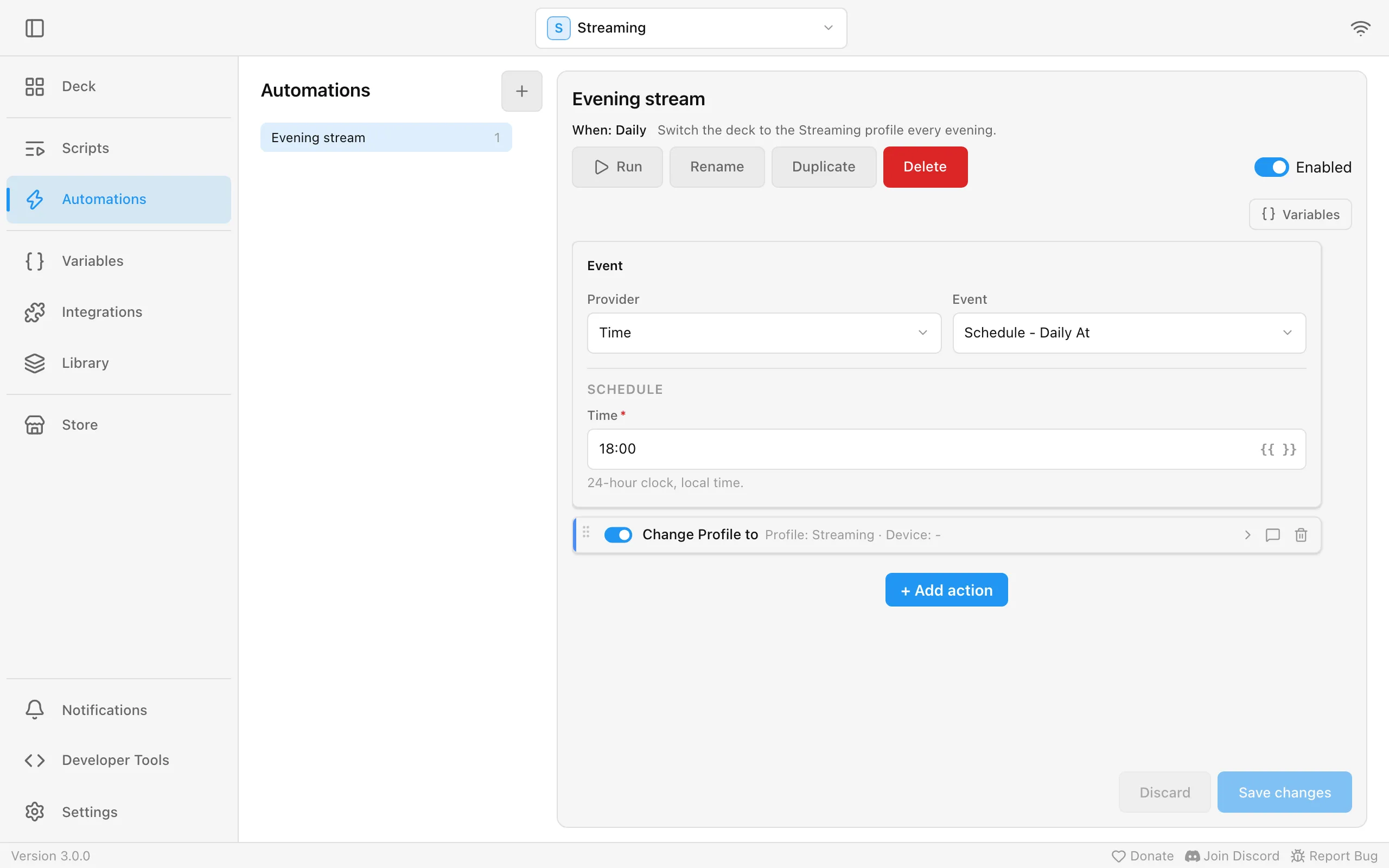
- Automation: actions that run on an event without belonging to a widget. Evening stream switches the deck to the Streaming profile every day at 18:00:
Other events: a device connects, a variable changes, OBS reports Streaming Started, a song starts playing.
Scripts and automations can keep variables of their own, for example a counter only one script uses: choose Variables in the editor’s toolbar. A script that runs on a widget also sees that widget’s variables. See Variables of a widget, script or automation.
Calendar triggers and Join Meeting
Section titled “Calendar triggers and Join Meeting”Three events from Calendar run actions around your meetings, in an automation or as an event trigger on a widget. The Calendar widget also has triggers of its own with the same names, which follow the widget’s calendars and lead time:
| Event | Runs |
|---|---|
| Event Starts Soon | A set time before an event starts. Set it with Lead time, 15 minutes by default. |
| Event Started | When an event starts. |
| Event Ended | When an event ends. |
Each can be limited to one Account or one Calendar; left empty, it runs for the events of every connected calendar. All-day events start and end at midnight. Each runs once per event.
Event Starts Soon also runs for an event Macro Deck first sees inside its lead time, such as one created or moved a few minutes before it starts, or when Macro Deck starts during that time, as long as the event has not started yet. Event Started and Event Ended only run while Macro Deck is running: an event that started while it was off does not run its actions afterwards. An event added shortly before it starts, while Macro Deck runs, still runs them when Macro Deck next reads your calendars, a few minutes late at most. A start or end that is more than a few minutes ago is never caught up, also not for a trigger you create later. If the same invitation is in two connected accounts, limit the trigger to one Account so it runs only once.
The actions they run can use the event’s values, such as {{ event.title }} in a text field:
| Value | Holds |
|---|---|
title, location, meetingUrl |
The event’s title, location and meeting link. Empty when the event has none. |
start, end |
Date and time in the local time of the computer running Macro Deck, such as 2026-10-05T09:00:00.0000000+02:00. |
allDay |
Whether it is an all-day event. |
calendar, account, provider |
The names of its calendar, account and provider, such as Work, you@example.com and Google Calendar. |
eventId, calendarId, accountId |
Ids, for conditions that compare them. |
The Join Meeting action opens the meeting link of the event that is running or starts within Starts within, 15 minutes by default, on the computer running Macro Deck. When several qualify, it picks the one starting closest to now. Calendar limits it to one calendar. All-day events and events without a meeting link are skipped, and when nothing qualifies, the action fails with No event with a meeting link is running or starting soon. Like the button in the details dialog, it does not open the link while the computer is locked, except on Linux. Put it on a key of a hardware deck, or run it from an automation on Event Starts Soon with a short lead time to join meetings automatically.
Meeting links come from invitations, and anyone can send you an invitation, so an automation that joins
every meeting can open a link from a stranger. Limit such a trigger to the Calendar or Account your
meetings are in, or add a condition, for example on {{ event.title }}, so it joins only the meetings
you expect.
Email triggers and variables
Section titled “Email triggers and variables”Five events from Email run actions when your inboxes change, in an automation or as an event trigger on a widget:
| Event | Runs |
|---|---|
| Email Received | When a new email arrives. |
| Unread Count Changed | When the number of unread emails in an inbox changes. |
| Email Read or Unread | When an email is marked as read or unread, for example in your mail app. |
| Inbox Disconnected | When an inbox loses its connection to the mail server. |
| Inbox Connected | When an inbox is connected again after it was disconnected. |
Each can be limited to one Inbox; left empty, it runs for every inbox. Email Received also takes a
Sender and a Subject, which must match the whole sender name and the whole subject. To react to part
of a subject, leave the field empty and add a condition on {{ event.subject }} to the actions instead.
Email Received runs once per email, for the 20 newest emails of an inbox. It does not run for the emails already there when Macro Deck starts or when you connect an inbox, so a restart does not replay your inbox. An email that arrived while an inbox was disconnected runs it once the inbox is back. Inbox Disconnected also runs when the mail server refuses the sign-in. Macro Deck keeps trying to reconnect, and Inbox Connected runs once the inbox is back.
The actions they run can use the event’s values, such as {{ event.sender }} in a text field:
| Value | Holds |
|---|---|
inboxName, inbox |
The inbox’s name, such as Work, and its id. Every event has them. |
sender, senderAddress |
The sender’s name, or the address when there is no name, and the address. Email Received; sender also Email Read or Unread. |
subject, preview, messageId |
The subject, the first words of the email and its id. Email Received; subject and messageId also Email Read or Unread. |
receivedAt |
When it arrived, in UTC, such as 2026-10-05T07:00:00.0000000Z. Email Received. |
unreadCount, previousUnreadCount |
The number of unread emails now and before. Unread Count Changed. |
isRead |
Whether the email is now read. Email Read or Unread. |
Email also brings variables. email_unread_count holds the unread emails of every inbox together and
email_inbox_count how many inboxes there are. Every inbox gets its own, named after it, for example
for an inbox called Work:
| Variable | Holds |
|---|---|
email_work_unread_count, email_work_total_count |
Its unread emails and all emails in it. |
email_work_latest_sender, email_work_latest_subject |
The sender and subject of its newest email. |
email_work_latest_received_at |
When its newest email arrived, in UTC, such as 2026-10-05T07:00:00.0000000Z. |
email_work_is_connected |
Whether it is connected. |
The name is taken from the inbox’s name once and kept, so renaming the inbox later does not rename its
variables. Two inboxes with the same name get email_work_... and email_work_2_.... The first 40 inboxes
get variables. While an email integration is turned off, its inboxes’ variables stay and read as
unavailable; removing an inbox removes its variables.
Notifications
Section titled “Notifications”Macro Deck tells you about things that need your attention in three ways.
- Short messages appear for a few seconds on top of the screen and go away on their own. Up to three show at once, the rest wait their turn.
- Dialogs wait until somebody answers. They can carry buttons and, when an integration needs more from you, a small form. Whatever you press on one screen closes the dialog on every other screen too, and the integration gets your answer once.
- The notifications list in the desktop app keeps what happened: login problems, available updates, results of imports and whatever integrations report. Entries that wait for you, such as an update ready to install or a plugin asking for access, are listed first under Requires attention. Entries you have not looked at carry a dot: click it to mark that entry as read. Mark all as read and Clear all are in the ⋮ menu at the top of the list. Closing a short message or a dialog never removes its entry from the list, and removing an entry never closes a message that is still showing.
Short messages and dialogs appear in the desktop app, in the web client and in the Companion app. A screen that connects while a dialog is open shows it right away. Each message says where it comes from: Macro Deck itself, a built-in integration or a plugin, with its name.
Show a notification from a button
Section titled “Show a notification from a button”The action Show Macro Deck notification (System integration) puts a message on your screens whenever a button, automation or flow runs it.
| Setting | What it does |
|---|---|
| Title and Message | The text. Both accept template variables. |
| Severity | Info, Success, Warning or Error. It sets the color and icon. |
| Show as | Short message, dialog, or neither, each optionally also in the notifications list. |
| Timeout | How long a short message stays. Leave it empty for the default of six seconds. A dialog without a timeout has an OK button. |
This is different from Send Notification, which shows a notification of your operating system instead of one inside Macro Deck.
Integrations and the Store
Section titled “Integrations and the Store”Integrations connect Macro Deck to other apps: OBS, Home Assistant, Voicemeeter, Spotify, SoundPad, AutoHotkey, Twitch, YouTube, Jellyfin, Discord, Discord Webhooks, Google Calendar, Outlook Calendar, email over IMAP, AdGuard Home, Steam and more. Turn on the ones you use under Integrations.
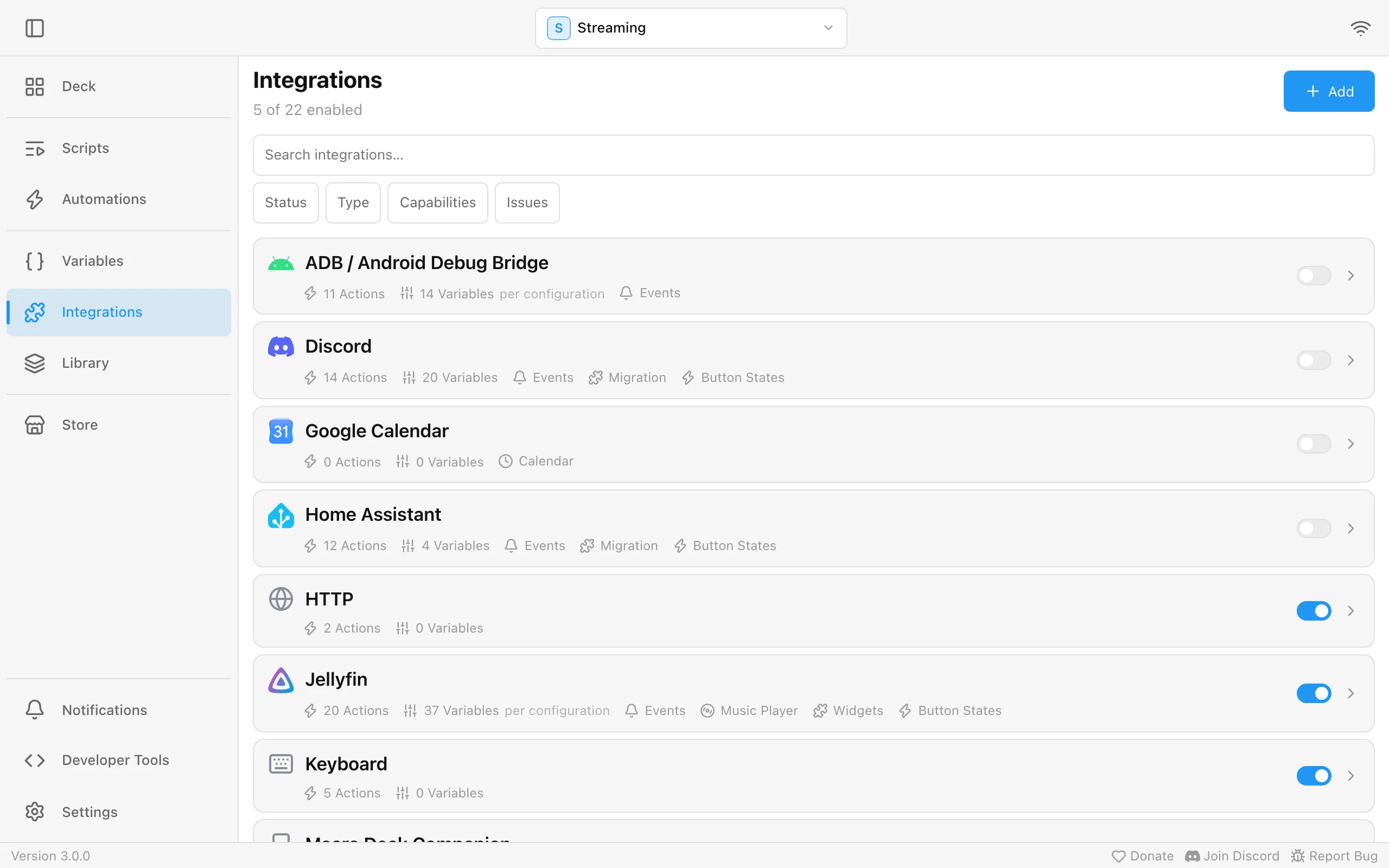
Open an integration or plugin to see what it provides. Capabilities on its Overview lists everything it brings along with how many of each, for example 12 actions, 3 widgets or 2 batteries; choose a row to open its page. Actions and Variables have their own tabs, and so do Events and Widgets when the integration has any. Widgets shows a preview of each widget the integration adds. Data the integration reads for you gets a page to look at it: its Batteries with their charge, its Calendar accounts, calendars and upcoming events, its Email Inbox with unread counts and the latest messages, its Weather locations and its Music Player. When an integration has two or more of these, they share one Data tab with a list to switch between them. The pages update by themselves while you watch, and say so when the integration is turned off or still starting instead of showing an empty list. Devices opens Settings > Devices.
The Store offers more plugins and icon packs. Everything published there is reviewed and signed first.
Plugins and icon packs in the Store are made by the community. The first time you open the Store, a notice explains that the creator of an item is responsible for it when something fails or doesn’t work: rate the item, open an issue in its repository or report it, using the links on its page, and don’t open issues about Store items in the Macro Deck repository. Everything in the Store is subject to the Store guidelines; the notice and the bottom of every Store page open them, next to the imprint and privacy policy. Got it hides the notice for good.
Discover opens with a search box and a chip for each kind of item (All, Plugins, Icon packs) with how many there are. Under those, a chip for each Store category that has items of that kind, such as Music or Streaming, lists only that category; choose it again to see everything. Below it, every item is listed as a card showing its kind, rating, installs and whether it is New (published in the last 30 days) or recently Updated. The list is sorted by Most popular unless you pick another order or search. Once the Store has enough items, rows for Featured, Popular and New & updated appear above the list, each item in at most one row. Searching also finds items by their tags. Only available for this platform hides items that do not run on your computer, and it stays on until you turn it off; a note says how many items it hides, with Show all next to it. Going back from an item’s page returns to the list as you left it: the same search, kind, category, order and scroll position.
The ⋮ menu at the top right of the Store has Refresh Store and Store settings. Refresh Store fetches the latest catalog and opens a log of each step as it happens. Macro Deck also refreshes on its own a few seconds after it starts and then once an hour. While a refresh runs, the Store header says Refreshing… in every window, and choosing Refresh Store again opens the log of that refresh instead of starting a second one. If the store registry is being updated while a refresh runs, the log says so and Macro Deck tries again a few times over about five minutes before it reports a failure. Store settings opens Settings > Store.
Installed at the top of the Store lists the Store’s plugins and icon packs you have installed, with their version and any update waiting for them. While updates are waiting, Installed shows how many. Update one at a time from its card, or all at once with Update all. After an update downloads, the card shows Installing… while Macro Deck backs up, installs and restarts the plugin, then the version that is now installed. See Updates for update notifications and automatic updates.
Icon packs from the Store are read-only on the Icon Packs page. You can use their icons on your buttons and export the pack, but you can’t rename, import, or delete icons in it, or edit its name and details. Deleting the pack there uninstalls it from the Store. To change the icons, export the pack and import the copy as a pack of your own.
An exported pack has a size limit: at most 29,995 icons, and only so much text for the icons’ names and details. When a pack is larger, Macro Deck tells you it is too large to export; split it into smaller packs.
An item’s page shows its screenshots and, in the details beside it, whether it runs on your platform. Below the screenshots, tabs show more about it:
- Description is the creator’s description of the item.
- Issues lists the open issues of the item’s GitHub repository, with their number on the tab, and New issue opens GitHub in your browser to report a problem. To show them, Macro Deck asks GitHub for the open issues when you open the page. Items without a GitHub repository have no issues to show.
- Versions lists every version, five per page, with its release date and release notes, and their number on the tab.
- Dependencies, on a plugin’s page, lists the packages the selected version was built with, with their number on the tab: the ones it uses directly, and the packages those pull in under a collapsed list. A version whose creator published no dependency list says so; that does not mean it has none.
- Code, when the item names its source repository, opens it in your browser, at the state of the selected version when its creator published where it was built from.
The share button next to the install button copies a link to the item’s Store page.
The page also lists Links its creator provides, such as its Homepage, the source repository, documentation or a place to report an issue. They open in your browser.
An item in a Store category lists it under Categories, and any other tags its creator gave it under Tags; select one to see every item in that category or with that tag. At the bottom, You might also like suggests items you have not installed that run on your computer: first those that share tags with it, then others from the same creator and of the same kind. Going back from a suggestion returns to the item you opened it from.
Under AI, the page shows what the creator declares about artificial intelligence: whether the item lets you interact with an AI system, generates content with AI, or contains images, sounds or texts created with AI, and which AI services it uses. Next to its name, an item that uses AI is marked Uses AI, and one that only contains content created with AI, such as an icon pack with AI-created icons, is marked Made with AI. If the creator has not declared anything, the page says so; that does not mean the item uses no AI.
For your own icon packs, select Edit on the pack under Library > Icon Packs (or Edit pack in its menu) and set AI-created icons. The setting is saved in the exported pack. When you merge a pack that contains AI-created icons into one of yours, your pack is marked as containing them too.
To install an older version, pick it under Version next to the install button. The latest version is selected by default. The button then says Install, Update to or Downgrade to that version, and a downgrade asks you to confirm first. Versions that cannot be installed on your computer stay in the list but cannot be selected. Whether a version works with your Macro Deck version is only known once it is downloaded: if it needs a newer Macro Deck, the Store says so and offers Check for updates instead of Retry. Versions lists every version with its release notes and lets you select one there too. See Updates for how an older version affects automatic updates.
Select the publisher’s name on a card or an item’s page to see everything that publisher offers. An installed plugin’s page has Open settings, which opens its integration; its back arrow returns to the Store page. An installed icon pack’s page has Open in Library. The other way round, a plugin’s page under Integrations and a Store icon pack under Library > Icon Packs have View in Store, for the description and release notes. An installed plugin is uninstalled from the General details of its page under Integrations, or from its Store page. Uninstalling a plugin also removes the variables it provided. On its Integrations page you can also tick Also delete the plugin’s stored data: that deletes the plugin’s own files and the accounts and connections set up for it, saved sign-ins included. Uninstalling from the Store keeps them, so a later reinstall picks up where you left off. If one of its files is still in use, the plugin stays installed and a message says its data could not be deleted; close whatever uses it and try again.
A macrodeck:// link to an item opens its page in Macro Deck, and a message appears if the item is no longer
in the Store. See Store links for the details, including the AppImage limitation.
The Store footer links to the Creator Portal, where you can publish your own plugins and icon packs, and to the imprint and privacy policy.
Store items show their star rating and how many times they have been installed. The install count leaves out updates and repairs, and appears once an item has been installed at least once. An item’s page lists its Ratings and reviews, which anyone can read. When the creator has answered a review, their reply appears under it as a Developer response. To rate or review an item yourself, sign in with Macro Deck Connect under Settings > Account and install the item first: only items you have installed can be rated. When you sign in, and whenever you install something while signed in, Macro Deck records your installed Store items for your account so you can rate them. If ratings or install counts cannot be reached, the Store keeps working without them.
While you are signed in, Macro Deck occasionally asks you to rate one of your installed Store items. The dialog shows the item and five stars; choose a star and Submit to send the rating, or add a written review if you like. Not now closes it without rating, and the item can come up again later. Macro Deck only asks about items you installed at least 7 days ago and have not rated yet, asks about one item at a time, and waits at least 5 days after a prompt was shown before it asks again. Updating an item does not restart the 7 days. Turn the prompt off with Ask me to rate installed extensions in Settings > Store.
To report a Store item, open its page and choose Report this item below the details. To report a review, choose Report next to it. Pick a reason and, if you like, add details; Other needs a short description. Reporting needs a Macro Deck Connect sign-in, and each review can be reported once per account. Reports go to the Macro Deck moderators and do not hide anything on their own: the item or review stays visible until a moderator has looked at it. Reporting Store items only works once the Store supports it; until then, Macro Deck tells you it is not available.
A plugin creator can invite you to test a plugin before it is reviewed. The invitation arrives by email; accept it in the Creator Portal with the same Macro Deck account you use in Macro Deck. While you are signed in under Settings > Account, Tests appears at the top of the Store next to Installed, listing every plugin you test. Each plugin starts collapsed and shows how many test builds it has; select it to see its builds, newest first.
Test builds are not reviewed or signed by Macro Deck: they come straight from the creator and may be unstable. Choosing Install or Install test build asks you to confirm that first. A test build replaces the version of the plugin you have installed, including one from the Store, and the build that is currently installed shows as Installed.
While a test build is installed, the plugin is marked Test build under Tests, Installed and Discover. If the plugin is also published in the Store, Return to Store version installs its current Store release in place of the test build.
Withdrawn versions
Section titled “Withdrawn versions”The Store can withdraw a single version of an item, for example when that version turned out to be unsafe. A withdrawn version is marked Withdrawn under Version and cannot be installed; the other versions stay available. If the version you have installed is withdrawn, its card is marked Version withdrawn, its page says why and may name a suggested replacement, and Macro Deck shows a warning notification. Update to the latest version from its card, or open its page to go back to the latest version with Downgrade to when the latest version is older than yours, or uninstall it.
When the latest version of an item is withdrawn, the item disappears from the Store and can no longer be installed or updated. If you have it installed, it stays under Installed, marked Removed from the Store, and its page says why; you can still uninstall it there.
The Included icon pack
Section titled “The Included icon pack”Macro Deck ships its own icon pack, Included, with simple line icons for hardware, network, battery, weather and audio, for example for the rings of a Gauges widget. It appears under Library > Icon Packs and in the icon picker like any other pack and works on every widget. Like a Store pack it is read-only and can’t be deleted. The icons are grey so they read on dark and light tiles; use Icon Color on a widget to recolor them.
Icon packs from plugins
Section titled “Icon packs from plugins”A plugin can bring its own icon packs, for example the logos of the services it controls. They appear under Library > Icon Packs and in the icon picker as soon as the plugin is installed, marked Plugin; hover the mark to see which plugin provides the pack. Use their icons on any button, not only on the plugin’s own.
These packs are read-only, like icon packs from the Store, and you can’t delete them yourself. They update together with the plugin: an update replaces the icons that changed, and buttons keep showing the icon they use.
When you uninstall the plugin, or an update no longer includes one of its packs, the pack is deleted. If a button or an automation still uses one of its icons, the pack stays instead, becomes an ordinary icon pack you can edit or delete, and Macro Deck shows a notification that says why it was kept. An icon that is only chosen in a plugin’s own settings does not count as used. When the plugin later brings the same pack back, for example after a reinstall, it takes the pack over again: the pack becomes read-only once more and any changes you made to it in the meantime are replaced by the plugin’s icons.
While a plugin developer runs a plugin from its project, its packs appear the same way. If that plugin is never installed, the packs stay as ordinary icon packs after the developer stops it.
Connect Google Calendar
Section titled “Connect Google Calendar”Macro Deck reads Google Calendar through an OAuth client of your own in Google Cloud. Setting it up is free and needed once; the setup in Macro Deck walks you through it and links to the right pages.
- Under Integrations, open Google Calendar and start its setup.
- In the Google Cloud Console, create or pick a project and enable the Google Calendar API for it.
- Set up the OAuth consent screen and set its publishing status to In production. While it stays in Testing, Google ends every sign-in after 7 days, and you would have to connect the account again every week.
- Create an OAuth client ID with the application type Desktop app. The setup shows the Redirect
URI Google sends the sign-in back to, such as
http://127.0.0.1:8193/api/integrations/oauth/callback; a Desktop app client accepts it without adding it anywhere. - Copy the client’s Client ID and Client Secret into the setup and continue. Your browser opens the Google sign-in.
- Google warns that it has not verified the app. That is expected for a client of your own: choose Advanced, continue to your app and allow access to your calendars.
Macro Deck asks Google only for read access to your calendars and for your email address, which names the account. Calendars you hid in Google Calendar’s list are left out of Macro Deck too; show them there to see their events. The client secret is stored encrypted and only ever sent to Google.
To connect another Google account, choose Add configuration on the Google Calendar page and sign in with that account; the same OAuth client works for all of them. If you connect an account that is already connected, Integrations shows Google account connected twice: remove the older configuration. When Google asks you to sign in again, see Troubleshooting.
Connect Outlook Calendar
Section titled “Connect Outlook Calendar”Outlook Calendar reads the calendars of a personal Microsoft account (Outlook.com, Hotmail, Live) or of a Microsoft 365 work or school account.
- Under Integrations, open Outlook Calendar and start its setup.
- Choose Continue. Your browser opens the Microsoft sign-in: sign in and allow Macro Deck to read your calendars.
- Choose the calendars Macro Deck should use. Your own calendars and calendars others shared with you are listed; a shared one shows who shares it.
Macro Deck asks Microsoft only for read access to your calendars and for your name and email address, which name the account. Recurring meetings show each occurrence, and a Teams meeting’s link is the event’s meeting link for Join Meeting. Only the calendars you chose reach widgets and triggers. A calendar you create or that someone shares with you later is not added on its own: choose Edit connection next to the account, sign in again and pick it. Some organizations only let an administrator allow apps; then the sign-in asks for an administrator’s approval.
Use an app of your own
Section titled “Use an app of your own”The sign-in goes through Macro Deck’s app at Microsoft. If your organization does not allow it, you can register an app of your own and enter it under Advanced in the setup. Microsoft only lets you register apps in a Microsoft Entra directory: a personal Microsoft account needs one first, for example from a free Azure account.
- In the Azure portal, open App registrations and register a new application. Under Supported account types, choose the accounts it should accept.
- Under Authentication, add the platform Mobile and desktop applications with the Redirect URI
the setup shows, such as
http://127.0.0.1:8193/api/integrations/oauth/callback. Do not add it under Web: that platform expects a client secret, and Macro Deck uses none. - Under API permissions, add the delegated Microsoft Graph permission Calendars.Read.
- In the setup, open Advanced and enter the app’s Application (client) ID. If the app accepts only the accounts of one organization, enter that organization’s tenant ID or domain as Tenant.
To connect another Microsoft account, choose Add configuration on the Outlook Calendar page and sign in with that account. If you connect an account that is already connected, Integrations shows Microsoft account connected twice: remove the older configuration. When Microsoft asks you to sign in again, see Troubleshooting.
Connect an IMAP account
Section titled “Connect an IMAP account”Email (IMAP) reads one folder of an email account, usually the inbox, from any provider that offers IMAP, such as Gmail, Outlook.com, iCloud Mail or the mail of your own domain. Macro Deck only reads: it never changes, moves or deletes an email, and never marks one as read.
-
Under Integrations, open Email (IMAP) and start its setup.
-
Fill in the account:
Field What to enter Configuration name The inbox’s name in Macro Deck, such as Work. Its variables are named after it. Email provider Your email service, see below. Pick Custom server for any service that is not listed. IMAP server Only for Custom server: the incoming mail server, such as imap.example.com.Port Only for Custom server: 993for SSL/TLS, the default, or usually143for STARTTLS.Security Only for Custom server: SSL/TLS encrypts the connection from the start, STARTTLS switches to encryption right after connecting. Use the one your provider names; both always encrypt and check the server’s certificate, and an unencrypted connection is not offered. Username Usually your full email address. Password Your password or an app password, see below. It is stored encrypted on this computer. Folder The folder to watch, INBOXby default.Email provider lists Gmail, iCloud Mail, Yahoo Mail, AOL Mail, Fastmail, Zoho Mail, Zoho Mail (EU), GMX, WEB.DE, T-Online, IONOS, mailbox.org and Posteo. For these Macro Deck fills in the server settings itself. For anything else, such as Outlook.com or the mail of your own domain, pick Custom server and enter the IMAP settings from your provider’s help pages, often listed under IMAP or other mail apps.
-
Continue. Macro Deck signs in once to check the settings, and says what went wrong if it cannot, such as a refused password or a folder that does not exist.
Most providers do not accept your normal password from other apps once two-step verification is on. Create an app password in your account’s security settings and enter it instead:
- Gmail: turn on 2-Step Verification, then create an app password under App passwords in your Google account.
- Outlook.com, Hotmail, Live and Microsoft 365: Microsoft lets most of these accounts sign in to IMAP only with OAuth, which Macro Deck does not support yet. If your account still offers app passwords, create one in the advanced security options of your Microsoft account.
- iCloud Mail: create an app-specific password at account.apple.com, under Sign-In and Security. The username is your iCloud email address.
Signing in with OAuth, the browser sign-in that Google Calendar and Outlook Calendar use, is not supported yet, so accounts that only allow that cannot be connected for now.
To add another account or another folder of the same account, choose Add configuration on the Email (IMAP) page. A folder that is already connected is refused. Macro Deck keeps a connection open and hears about new mail within seconds when the server supports it, and checks every minute when it does not. When the server refuses the password later, for example after you changed it, Integrations shows Email sign-in failed for the account: choose Edit connection next to the account and enter the current password or a new app password. See Troubleshooting for other problems.
Macro Deck tells inboxes apart by their server, port, Username and Folder; a listed provider and
Custom server with the same settings are the same inbox. Changing any of these with Edit connection,
including picking another provider, turns the account into a new inbox: select it again in your Email Inbox
widgets and in the Inbox of your Email triggers, and its variables get a new name, such as
email_work_2_unread_count instead of email_work_unread_count. A new password or a new configuration name
keeps the inbox as it is.
Managing OBS recordings
Section titled “Managing OBS recordings”Besides starting and stopping a recording, the OBS Studio integration can manage one while it runs:
- Split Recording File starts a new file and keeps recording.
- Create Recording Chapter adds a chapter marker, optionally with a name. OBS supports chapters only for the Hybrid MP4 format.
- Set Recording Directory changes the folder OBS saves new recordings to. Enter the path as OBS sees it: when OBS runs on another computer, that is a folder on that computer.
Split and chapter only work while OBS is recording. Otherwise the action fails and says that OBS is not recording. If OBS refuses a request, for example a chapter in a format without chapter support or a folder it cannot use, the action fails and shows OBS’s reason.
Use the events Recording File Changed (when a recording starts, moves to a new file or stops) and Screenshot Saved as triggers, for example to move a finished file or to send yourself a notification. Both carry the file’s path. The variables Last Recording File and Last Screenshot hold the latest of these paths. They keep their value across splits and when OBS disconnects, and start empty again when Macro Deck restarts or you edit the OBS configuration.
Devices
Section titled “Devices”Every phone, tablet or browser that connects shows up in Settings > Devices. Choose there which profile each device opens with. If you delete the profile a device is showing, the device switches to the profile it opens with, or to your first profile if that one is gone too.
For a deck in a browser, choose Hide settings button in its menu there to take the settings button off its screen, and Show settings button to bring it back. The deck’s own settings have the same Hide settings button switch under Display, and both change the same setting. The device then reaches its settings with a swipe in from the left edge of the screen, which slides in a panel with the settings button. The swipe can start a little in from the edge, which helps where the system uses a swipe from the left edge for Back, such as Android gesture navigation or a Safari tab. Hiding the button is not a lock: anyone at the device can still swipe.
When you are signed in under Settings > Account, a Companion app license this computer got from a purchase is saved to your Macro Deck account, and your other computers signed in to it that have no license yet receive it within about a minute (see The Companion app stays unlicensed after a purchase).
Open source licenses
Section titled “Open source licenses”Macro Deck is built on open source software. Settings > About > Open source licenses lists every
third-party component it includes, with its license and the full license text; search by name or license.
On a phone or tablet, the web client’s settings offer the same list under Open source licenses. The
files LICENSE, NOTICE and THIRD-PARTY-NOTICES also sit next to the Macro Deck host in the installation
folder, and the Linux AppImage adds a notices file for the system libraries it bundles.