
Companion app
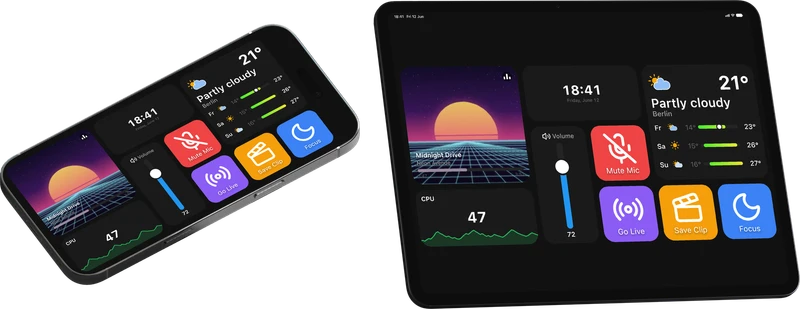
Macro Deck Companion is an optional, paid add-on to Macro Deck: a native app for Android phones and tablets, iPhone and iPad. Unlike Macro Deck itself, the app is closed source. It shows the same decks as the free web client, but draws them natively and adds what a browser on a phone or tablet cannot do. You do not need it to use Macro Deck: every device with a current browser can use the web client.
Reasons to buy
Section titled “Reasons to buy”| Reason | What you get |
|---|---|
| Better performance | The app draws the deck natively, without a browser in between. It reacts faster and uses less battery, most noticeably on older phones and tablets. See Compatibility. |
| Easier to set up | It finds your computers on the network, and scanning the QR code signs it in without a password. The deck fills the screen and stays on without turning on HTTPS, trusting a certificate or installing a web app. |
| Extra features | Gestures, several computers at once, USB without debugging, and actions and variables for the device itself. See the comparison below. |
| Supports Macro Deck | Macro Deck itself is free and open source. The app’s license supports its active development. |
App or web client?
Section titled “App or web client?”Both show your decks exactly as you built them on the computer. The app adds:
✅ yes · ☑️ partly, see the notes below the table · ➖ no
| Web client | App | |
|---|---|---|
| On the deck | ||
| Your decks, exactly as on the computer | ✅ | ✅ |
| Drawn natively, no browser in between | ➖ | ✅ |
| The deck fills the screen, no browser bars* | ☑️ | ✅ |
| Keeps the screen on** | ☑️ | ✅ |
| Swipe through folders and profiles | ➖ | ✅ |
| Several computers open, a swipe apart | ➖ | ✅ |
| Haptic feedback on every press | ➖ | ✅ |
| Connection | ||
| Finds your computers on the network | ➖ | ✅ |
| Several addresses per computer, the one that answers is used | ➖ | ✅ |
| Connects over USB*** | ☑️ | ✅ |
| In Macro Deck | ||
| Actions for this device: brightness, rotation, vibration, screenshots, and on Android turning the screen on and off | ➖ | ✅ |
| Battery, network, memory and on iOS CPU of this device as variables | ➖ | ✅ |
| Supports the active development of Macro Deck | ➖ | ❤️ |
* Only where the browser supports it, usually once the web client is installed as an app (PWA).
** Only where the browser supports it, usually only with HTTPS turned on in Macro Deck.
*** Only on Android with USB debugging: the device’s browser opens http://127.0.0.1:8193, and ADB forwards
it to Macro Deck. The app connects over USB on Android, iPhone and iPad, also without USB debugging. See
Connect over USB.
Requirements
Section titled “Requirements”- Android 6 or later, or iOS and iPadOS 15 or later. Phones and tablets both work, in portrait and landscape.
- Macro Deck 3 on a computer in the same network, or connected by USB.
- A license or the free 7-day trial. The license is a one-time purchase, and once one device bought it, your other phones and tablets get it from your computer. See License and trial.
Get the app
Section titled “Get the app”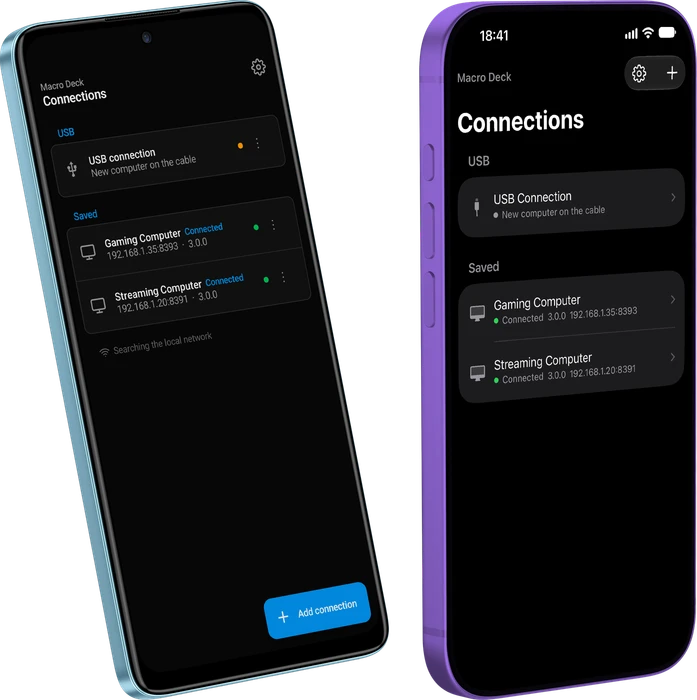
- Android: Macro Deck Companion on Google Play. For devices without Google Play, such as Amazon Fire tablets, Macro Deck can install a version without Google Play services.
- iPhone and iPad: Macro Deck Companion in the App Store.
In this section
Section titled “In this section”- Set up and connect: add your computer, sign in, start the trial.
- Use the deck: gestures, several computers, per-connection settings.
- App settings: every setting in the app.
- License and trial: what the license covers and how it reaches your devices.
- Android and iPhone and iPad: what is different on each.
- Install the Android app from Macro Deck: the version without Google Play services.
- Tips and automations: turn the screen off when Macro Deck quits, and more.
- FAQ: why the app costs money, and what one purchase covers.