
License and trial
The Companion app needs a license to open a deck. Every device can try it for free for 7 days first, and one purchase covers all your phones and tablets.
One purchase for all your devices
Section titled “One purchase for all your devices”The license is a one-time purchase in the App Store or on Google Play, with no subscription. It does not stay on the phone you bought it on: the app hands it to your computer, and Macro Deck gives it to every Companion app that connects. Your other phones and tablets get it from there, whether they run Android or iOS, and also the Android version without Google Play, which cannot buy one itself.
- Buy the license in the app on one device: tap Buy license on the paywall, or in the settings.
- Open a deck of your computer on that device. Macro Deck turns the purchase into a license with the Macro Deck servers, which needs an internet connection on the computer.
- Every other device that connects to this computer receives the license within moments.
Settings > Companion App in Macro Deck shows whether the computer holds a license. Show details reveals where it came from, the license ID and when it was issued.
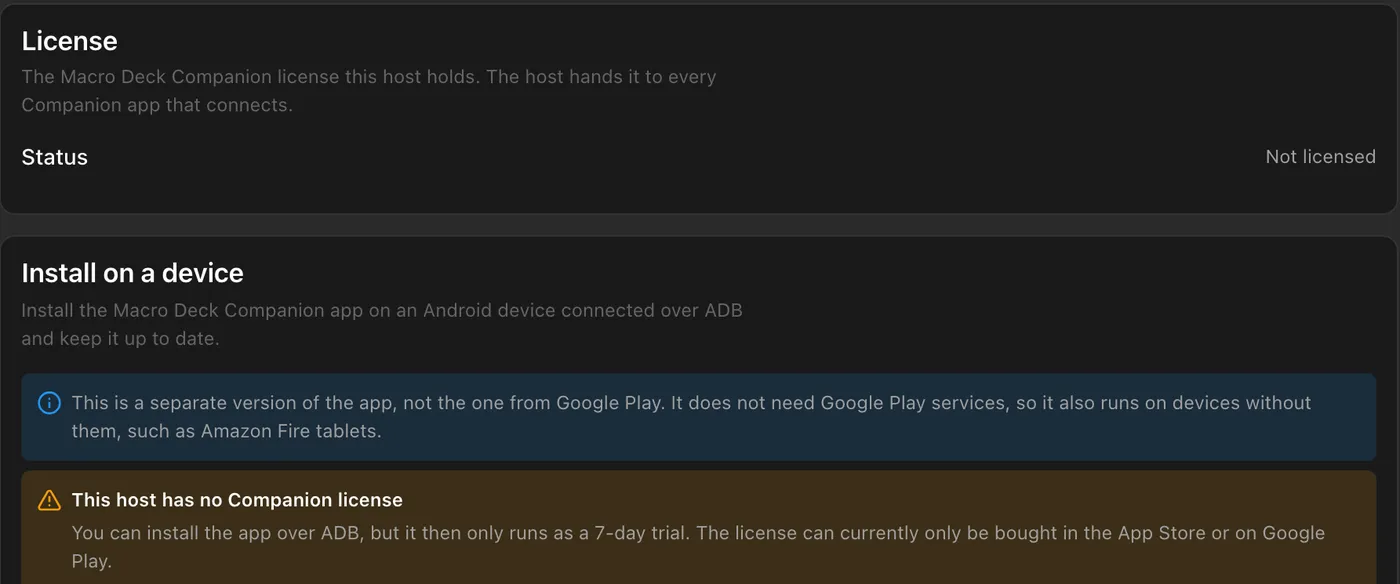
When you are signed in under Settings > Account, Macro Deck also saves the license to your Macro Deck account, and your other computers signed in to it receive it within about a minute. If a license does not show up, see The Companion app stays unlicensed after a purchase.
Redeem a promo code
Section titled “Redeem a promo code”Got a promo code for the Companion app? Redeem it in Macro Deck instead of buying the license:
- Sign in under Settings > Account. Without an account the Redeem button stays disabled and the License section says to sign in.
- Open Settings > Companion App and select Redeem in the License section.
- Enter the code in the dialog and select Redeem. Capitals, dashes and spaces do not matter.
The license is then linked to your Macro Deck account and shows Promo code as its source. It reaches your other devices the same way a purchased license does. Macro Deck needs an internet connection to redeem a code, and the Companion app itself needs no change.
Codes from Google Play or the App Store are not promo codes: Macro Deck does not accept them. Redeem those in the respective store.
If the code does not work, Macro Deck says why: it is not valid, has expired or was already redeemed, or your account is suspended. After too many attempts in a row, wait for the time Macro Deck names and try again. The Redeem button is not shown while the computer already holds a purchased license, and a code is then not used up.
Giving the license to another computer
Section titled “Giving the license to another computer”A licensed device that connects to a computer without a license asks Transfer license to this computer? and shows the computer’s identity, as in Macro Deck’s network panel. Transfer gives the computer the license, so it can pass it on; Not now asks again the next time you open that connection.
Only transfer the license to your own Macro Deck installations, never to someone else’s. A license passed on to others can be revoked, and the terms of service apply.
The 7-day trial
Section titled “The 7-day trial”Each device can try the app for 7 days. On the paywall, tap Start 7-day trial.
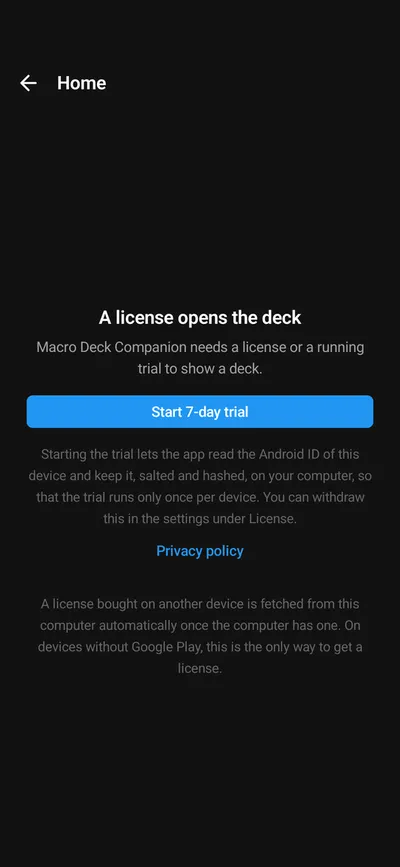
- Starting the trial is your consent to a trial ID for this device: on Android the app keeps the Android ID salted and hashed on your computer, on iPhone and iPad a random ID from the device’s keychain. It makes the trial run only once per device, also after reinstalling the app.
- The trial runs on your computer’s clock, so changing the date on the phone does not extend it.
- The Connections screen shows the days left. After 7 days, decks show the paywall again until a license arrives; your connections and settings stay.
- Remove trial ID in the settings withdraws the consent. A trial that is running keeps running.
The trial needs Macro Deck to answer first, so the button waits a moment after connecting.
Restore a purchase
Section titled “Restore a purchase”Restore purchase (iPhone and iPad: Restore Purchases) gets back a license bought with the same store account, for example after reinstalling the app. Usually you do not need it: a device that connects to a computer with a license gets it from there anyway.
A purchase that is refunded before any computer turned it into a license is removed from the device again.
The Android version without Google Play
Section titled “The Android version without Google Play”Macro Deck can install a version of the Android app that needs no Google Play services, for devices such as Amazon Fire tablets. This version cannot buy anything: it gets its license only from a computer that already has one, so buy the license once on any phone or tablet with the App Store or Google Play, and open a deck of that computer with it. Until then the app runs as a 7-day trial, as the install section in Settings > Companion App says.
If you bought the Macro Deck 2 app
Section titled “If you bought the Macro Deck 2 app”Bought the earlier Macro Deck 2 app for iPhone or iPad? You do not need to buy again. See The Companion app stays unlicensed after a purchase for how to transfer the purchase.
For support
Section titled “For support”Quote the License ID from the app’s license details or from Settings > Companion App in Macro Deck. It is safe to share. Never post receipts, order numbers or email addresses in public issues.